Windows XP Windows 7 Windows 2003 Windows Vista Windows 綜合教學 Linux 系統教學
Windows 10 Windows 8 Windows 2008 Windows NT Windows Server 電腦軟體教學

Win8 TrustedInstaller.exe 佔用 CPU 高?關閉自動更新或改為手動服務緩解

編輯:Win8 系統應用技巧

TrustedInstaller.exe (Windows 模組安裝程式) 負責更新安裝,更新期間佔用高 CPU 屬正常,完成後自動釋放。

緩解辦法

  1. 改變更新模式:控制台 → Windows Update → 變更設定 → 選擇「讓我選擇是否下載/安裝」等非自動選項。
  2. 設定服務為手動/停用:
    Win+R services.msc → Windows Module Installer → 啟動類型改「手動」或「停用」 (停用將無法安裝更新)。
    或 Win+R msconfig → 服務 → 取消勾選 Windows Module Installer。
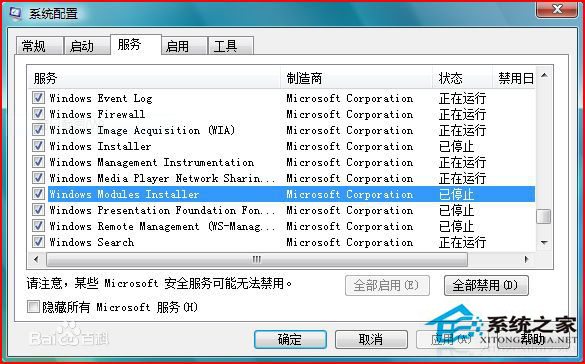
建議保持自動更新確保安全,僅在更新期間忍受短暫高 CPU;若長期高佔用則可能為更新卡住,嘗試重啟 Windows Update 服務或執行 sfc /scannow 修復。

Copyright © Windows教程網 All Rights Reserved