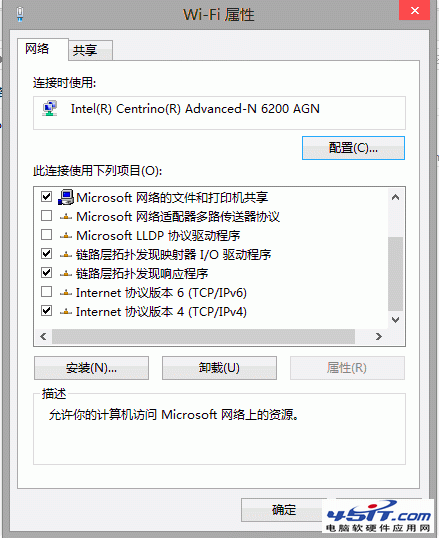
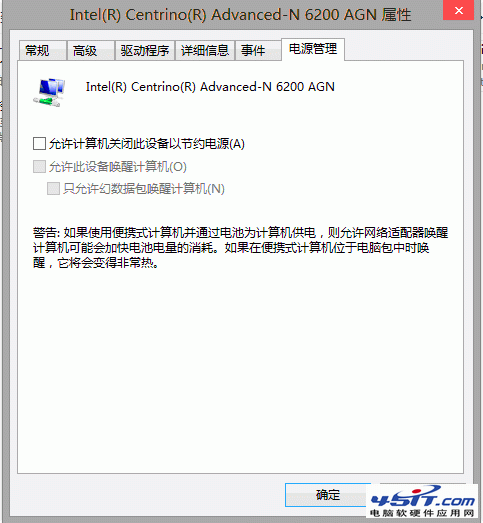
Windows 8 無線網路不穩定頻繁斷線,嘗試以下三步驟改善:
Windows 8 平板電腦難成主流 10 大理由 (上):分析師不看好、消費者陌生、企業部署緩慢
Win8 修改檔案關聯與開啟方式完整教學:控制台預設程式與右鍵選單雙管齊下
Windows 8 消費者預覽版六大缺點:關機鈕難找、開始選單消失、應用商店缺貨等
如何透過裝置管理員確認電腦是否內建無線網卡
Start8 讓 Windows 8 重獲開始按鈕:免費體驗版功能詳解
Windows 8 設定固定 IP 位址教學:圖文詳細步驟(適用 IP 衝突、列印共享、網路受限)
Windows 8 顯示隱藏檔案與資料夾教學:透過檔案總管選項快速設定
如何辨識 Windows 8 ISO 是否為正式版?檢查 install.esm 與檔案大小