Windows 8.1 Update 安裝失敗出現錯誤碼 80070020、80073712、0x800f081f,社群高手提供兩行 DISM 指令即可修復:
80070020
80073712
0x800f081f
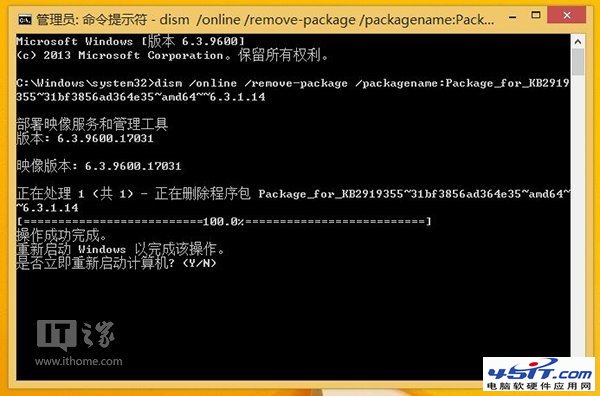
dism /online /remove-package /packagename:Package_for_KB2919355~31bf3856ad364e35~amd64~~6.3.1.14
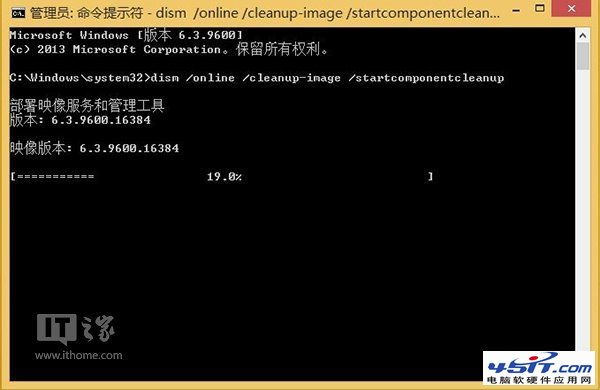
dism /online /cleanup-image /startcomponentcleanup
Windows 8 防盜版採用 OA 3.0 激活技術:主板級綁定、OEM 專用
Windows 8 錯誤 0x80070005 拒絕存取怎麼解決?以管理員身分執行修復教學
關閉 Windows 8 微軟輸入法「文字轉換錯誤」彈窗干擾
Windows 8 原生支援 VHD 掛載:雙擊即用,告別磁碟管理器繁瑣操作
Windows 8 ARM 平台三大陣營:高通、德州儀器、輝達合作夥伴佈局
Windows 8.1 本地升級教學:掛載 ISO 直接安裝,免光碟/USB
Windows 8.1 安裝後硬碟變「可攜式裝置」?驅動程式過舊惹禍
Windows 8 系統截圖曝光:Core 版與 Pro 版功能差異完整對比