Windows XP Windows 7 Windows 2003 Windows Vista Windows 綜合教學 Linux 系統教學
Windows 10 Windows 8 Windows 2008 Windows NT Windows Server 電腦軟體教學

Windows 8 分畫面 (貼靠) 功能教學:Metro App 與傳統桌面並排顯示

編輯:Win8 系統基礎知識

Windows 8 貼靠分畫面功能操作指南

Windows 8 提供「貼靠」功能,可將兩個 App (含傳統桌面) 並排顯示於螢幕左右兩側,方便同時參考資料。需螢幕解析度 ≥ 1366×768。

操作步驟

  1. 在 Metro 介面開啟一個 App (如 IE)。
  2. 開啟 Metro App
  3. 滑鼠移至螢幕左上角,出現已開啟 App 縮圖 (含傳統桌面)。
  4. 左上角縮圖
  5. 對目標 App (如「傳統桌面」) 按右鍵 → 選擇「貼靠左側」或「貼靠右側」。
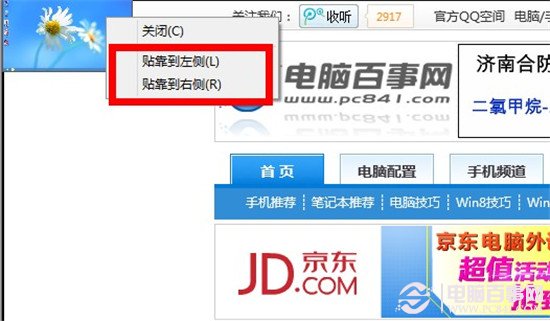
  6. 貼靠選單
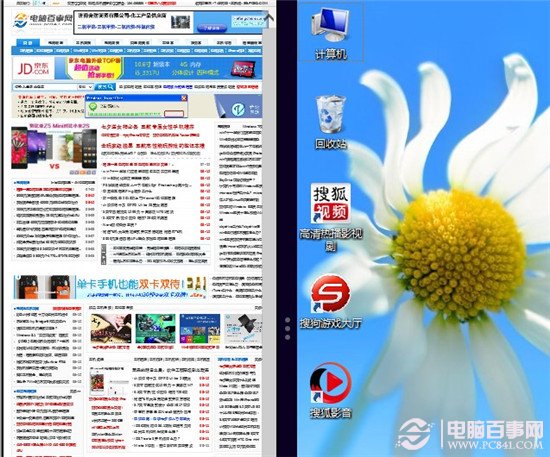
  7. 螢幕自動分割為兩區,各自獨立操作,中間分隔線可拖曳調整寬度比例。
  8. 分畫面結果

傳統桌面視為一個 App 參與貼靠,支援桌面視窗內再做並排。善用此功能可大幅提升多工效率。

Copyright © Windows教程網 All Rights Reserved