Windows XP Windows 7 Windows 2003 Windows Vista Windows 綜合教學 Linux 系統教學
Windows 10 Windows 8 Windows 2008 Windows NT Windows Server 電腦軟體教學

打造高視覺品質的 Windows 8 固定網站磚

編輯:Win8 系統基礎知識

微軟在 IE 官方部落格回應開發者需求,介紹如何為 Windows 8「開始」畫面上的固定網站磚提供高解析度視覺效果,強化品牌呈現。

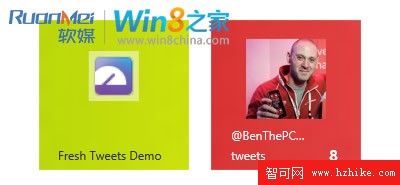
兩種呈現模式對比

左側為自動從 favicon 擷取顏色的預設效果;右側為自訂高解析度 PNG 圖片搭配專屬磚背景色的進階效果,品牌辨識度顯著提升。
Meta 標籤實作方法

在網頁 `` 區塊加入以下標記:

<meta name="msapplication-TileImage" content="images/benthepcguy-144.png"/>
<meta name="msapplication-TileColor" content="#d83434"/>

規範:

  • 磚圖片必須為 144×144 像素的正方形 PNG
  • 建議使用透明背景,而非填滿磚顏色
  • 磚顏色採 CSS 十六進位 RGB 表示法(如 #rrggbb 或 rgb())

注意:僅當用戶將網站固定到「開始」畫面時,IE10 才會下載磚圖片,避免額外頻寬消耗。

Copyright © Windows教程網 All Rights Reserved