Windows 8 內建微軟拼音若不需使用,可透過語言設定新增英文 (美國) 後,將「中文 (簡體)」移除,即可徹底淘汰系統預設輸入法。
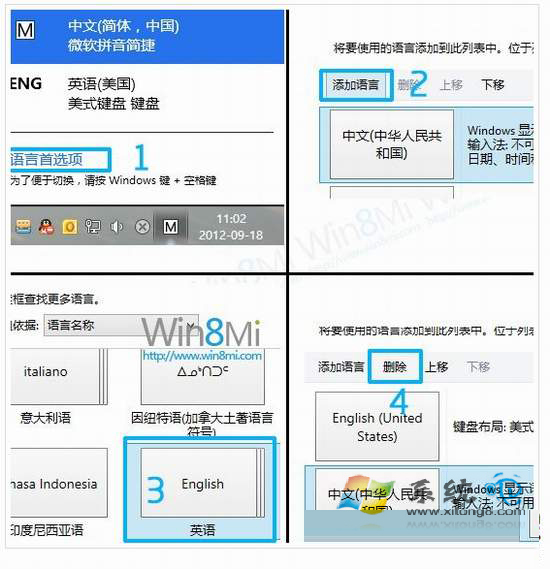
移除後系統僅保留英文輸入法,若需中文輸入請改裝第三方輸入法 (搜狗、QQ、Google 等)。
向日葵远程控制 vs Windows 8 远程桌面:跨网、免设置、多端、高安全全方位胜出
Windows 8 磚貼個人資訊清除四大法:關閉動態、Charms 清除、刪除歷程、群組原則自動清理
Windows 8 开机直达桌面跳过开始屏幕:SCF 快捷方式放入启动文件夹实现
Win8/8.1 藍牙滑鼠斷線/無法連線徹底解決:停用藍牙裝置省電喚醒
Win8 應用商店錯誤 0x80240437 解決方案:重置 Windows Update 元件
Windows 8 縮圖顯示錯亂/不顯示?兩種方法重建縮圖快取 (磁碟清理 / 手動刪除 thumbcache_*.db)
Win8 應用商店下載報錯 0x80240437?重置 SoftwareDistribution 組件(同 17005)