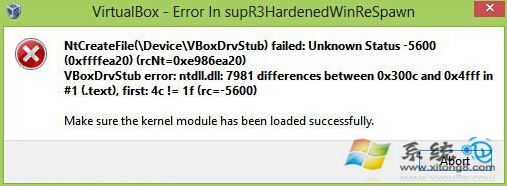
Windows 8 安裝更新 KB3045999 後,VirtualBox 虛擬機無法啟動、報錯 VERR_NEM_VM_CREATE_FAILED 或 VERR_NEM_MISSING_KERNEL_API,主因是該更新啟用了 Hyper-V 相容功能與 VirtualBox 衝突。解除安裝該更新並關閉自動更新即可恢復。
修復步驟
- 控制台 → 程式和功能 → 檢視已安裝的更新。
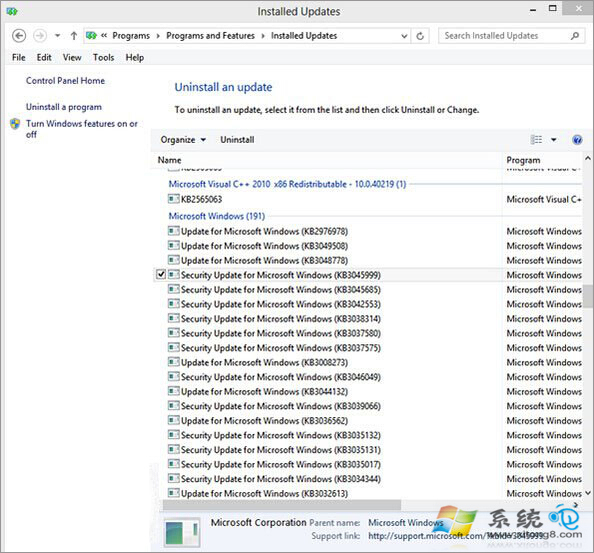
- 搜尋 KB3045999,右鍵 → 解除安裝。
- 重新開機,VirtualBox 應可正常啟動虛擬機。
- 建立 暫停更新 或關閉 Windows Update 自動更新,防止 KB3045999 重複安裝。
根因與替代方案
- KB3045999 強制啟用 Windows Hypervisor Platform,與 VirtualBox 5.x 衝突。VirtualBox 6.0+ 已支援 Hyper-V 共存 (需在設定→系統→加速→啟用 Hyper-V 選項)。
- 若需保留 Hyper-V (Docker Desktop、WSL2、Android Emulator 需求),請升級 VirtualBox 至 6.1+ 並啟用「使用 Hyper-V」選項,而非解除更新。
- 命令列永久停用 Hyper-V:
bcdedit /set hypervisorlaunchtype off (重開機生效),但會導致 Docker/WSL2 無法運作。