Windows 8 右鍵「這台電腦」→「管理」彈出「該檔案沒有與之關聯的程式來執行該作業」,主因是 .exe 檔案關聯登錄損毀。建立 .reg 檔案匯入修復 HKEY_CLASSES_ROOT\.exe 與 HKEY_CLASSES_ROOT\exefile 鍵值,即可恢復正常。
Windows Registry Editor Version 5.00

[HKEY_CLASSES_ROOT\.exe]
@="exefile"
"Content Type"="application/x-msdownload"

[HKEY_CLASSES_ROOT\exefile\PersistentHandler]
@="{0910f247-bae0-11cd-b579-08002b30bfeb}"
修復exe關聯.reg (副檔名必為 .reg)。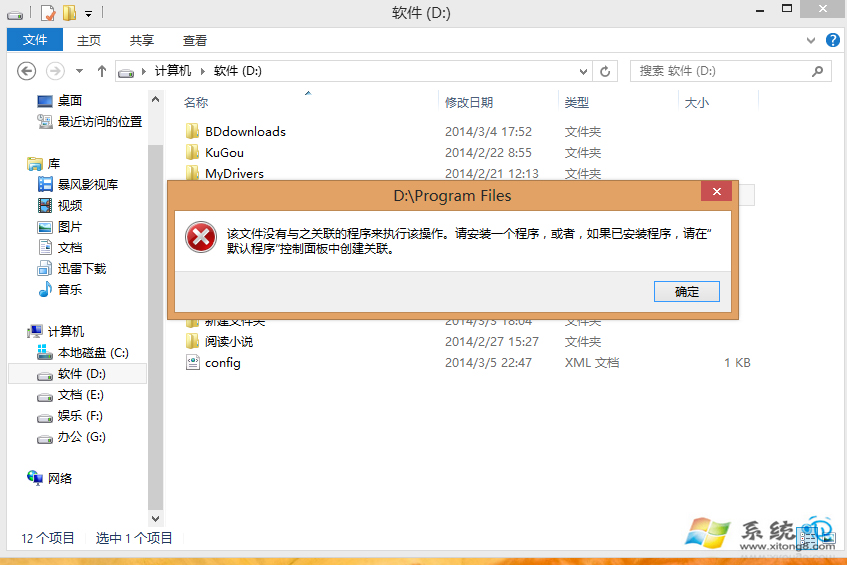
.reg 檔案直接修復 HKEY_CLASSES_ROOT\.exe (預設值 exefile) 與 PersistentHandler (處理常式 GUID),避免在龐大登錄中手動尋找。同原理可修復 .lnk、.bat、.cmd 等關聯損毀,只需替換對應 GUID 與 ProgID。
若大量副檔名關聯損毀,建議使用 FileTypesMan (NirSoft) 圖形化介面批次檢視/修復,或 Registry Backup/Restore 還原備份。