Windows XP Windows 7 Windows 2003 Windows Vista Windows 綜合教學 Linux 系統教學
Windows 10 Windows 8 Windows 2008 Windows NT Windows Server 電腦軟體教學

安裝 Win8.1 後 C 槽空間變小原因與清理方法

編輯:Windows 8 系統介紹

安裝 Win8.1 後 C 槽可用空間大幅縮減,主因是未格式化直接覆蓋安裝,保留舊系統資料夾 Windows.old。

正確清理步驟 (勿直接手動刪除 Windows.old)

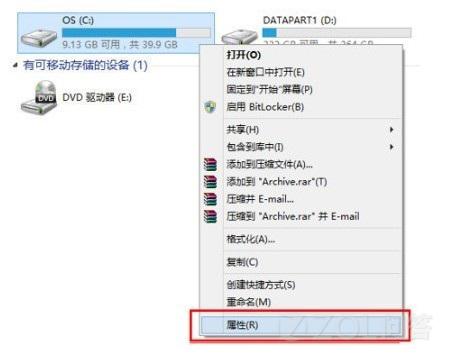
  1. 「電腦」/「這台電腦」 → 右鍵 C 槽 → 「內容」。
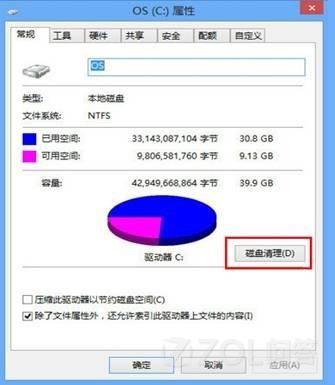
  2. 點選「磁碟清理」。
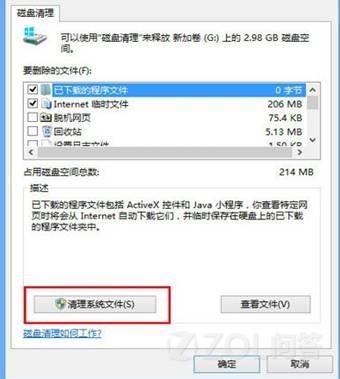
  3. 點選「清理系統檔案」 (需管理員權限)。
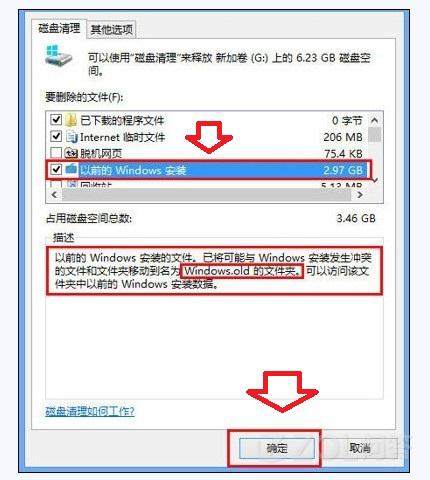
  4. 勾選「舊版 Windows 安裝」 → 確定 → 等待清理完成。
  5. 最後再手動刪除殘留的 Windows.old 資料夾 (若仍存在)。

C 槽內容磁碟清理

磁碟清理視窗

清理系統檔案

勾選舊版 Windows 安裝

磁碟清理工具會安全移除舊系統檔案並更新登錄,避免手動刪除導致系統參考錯誤。

Copyright © Windows教程網 All Rights Reserved