在傳統工作列切換 Modern 應用程式
Windows 8.1 允許在傳統桌面工作列顯示 Modern 應用程式圖示,實現桌面與 Modern 環境無縫切換,無需返回開始畫面。
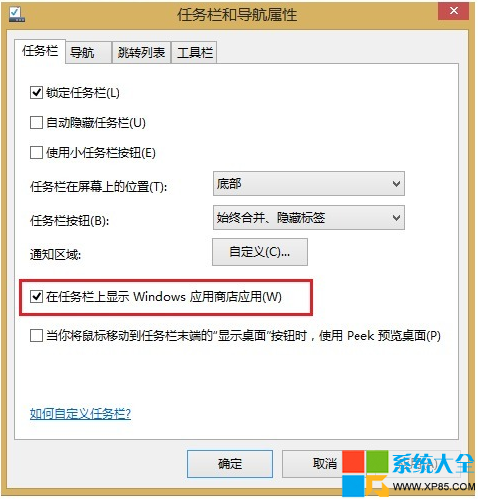
方法一:工作列屬性設定
- 桌面工作列空白處右鍵 → 「內容」
- 「工作列」頁籤 → 勾選「在工作列上顯示 Windows 應用商店應用程式」
- 點選「確定」
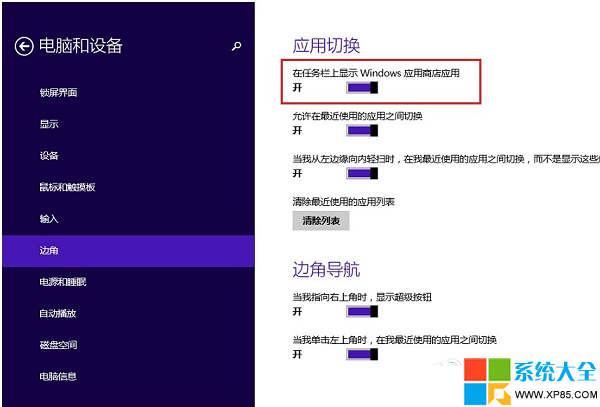
方法二:電腦設定介面
- Win + I → 「變更電腦設定」
- 「電腦與裝置」 → 「邊角」
- 開啟「在工作列上顯示 Windows 應用商店應用程式」
使用效果
- 啟動的 Modern 應用程式會出現在工作列,可像桌面程式一樣點選切換
- 滑鼠指向工作列底部可在 Modern 應用中呼叫工作列
- 支援 Alt + Tab 混合切換桌面與 Modern 應用
- 通知區域整合 Modern 應用通知
進階技巧
- 右鍵工作列 Modern 應用圖示 → 「釘選到工作列」常用應用
- 設定 → 「工作列」 → 「合併工作列按鈕」→ 「從不合併」可顯示應用標題
- 多螢幕環境下,可設定各螢幕工作列獨立顯示對應應用
注意:此功能僅適用 Windows 8.1,Windows 8 無此選項。Windows 10 預設啟用並進一步優化體驗。