Windows XP Windows 7 Windows 2003 Windows Vista Windows 綜合教學 Linux 系統教學
Windows 10 Windows 8 Windows 2008 Windows NT Windows Server 電腦軟體教學

快速查詢 Win 8.1 WinSxS 資料夾真實大小:DISM 工具教學

編輯:Windows 8 系統介紹

WinSxS 資料夾大小謎題與真實查詢方法

WinSxS (Windows Side-by-Side) 元件存放區透過硬連結共享系統檔案,導致檔案總管顯示大小虛高(常達 10-15 GB),實際獨佔空間遠小於此。使用內建 DISM 工具可查詢真實大小。
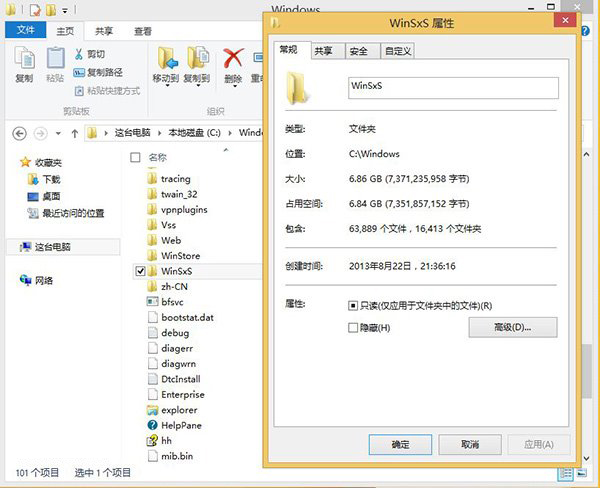
檔案總管顯示虛高大小 管理員命令提示字元 DISM 查詢結果

查詢指令

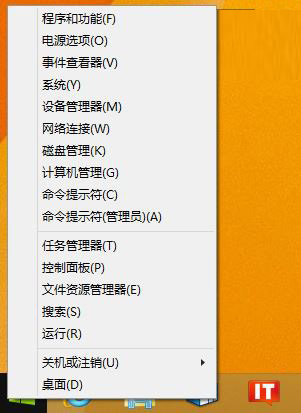
  1. 以系統管理員身分開啟命令提示字元
  2. 執行:
Dism.exe /Online /Cleanup-Image /AnalyzeComponentStore

結果解讀

元件存放區資訊:
Windows 資料夾大小     : 12.50 GB
元件存放區大小        : 8.20 GB
  共用元件              : 4.10 GB
  備份與停用功能        : 2.80 GB
  快取與暫存資料        : 1.30 GB
實際大小                : 5.40 GB
  • Windows 資料夾大小: 檔案總管顯示的虛擬大小(含硬連結重複計算)
  • 元件存放區大小: WinSxS 實際磁碟佔用
  • 實際大小: 扣除共用元件後的獨佔空間

清理 WinSxS 釋放空間

# 移除取代的更新元件(安全)
Dism.exe /Online /Cleanup-Image /StartComponentCleanup

# 含重設基底版本(不可解除更新,謹慎使用)
Dism.exe /Online /Cleanup-Image /StartComponentCleanup /ResetBase

# 分析後再決定
Dism.exe /Online /Cleanup-Image /AnalyzeComponentStore


重要原則

  • 勿手動刪除 WinSxS 檔案:會破壞系統元件完整性,導致更新失敗、功能異常
  • 僅使用 DISM 官方清理指令
  • Windows 8.1+ 已自動排程維護清理
  • 若磁碟空間極度緊張,優先清理:暫存檔、回收站、休眠檔、舊版 Windows.old、大型應用程式
Copyright © Windows教程網 All Rights Reserved