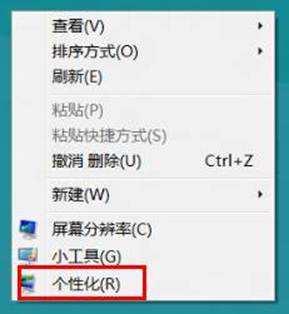
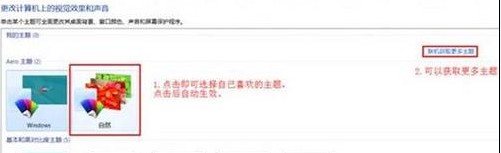
Windows 8 桌面主題一鍵切換,支援線上下載更多:
主題檔案為 .themepack 格式,雙擊即可安裝。亦可自行建立主題:設定好背景幻燈片、色彩、聲音後,在個人化視窗右鍵未命名主題 → 「儲存主題供分享」。
.themepack
Windows 8 開機直接進入桌面模式:登錄檔修改 Shell 鍵值實現跳過 Modern 介面
Win8 新增印表機完整圖文教學
Windows 8 開機 CPU 高佔用、硬碟燈狂閃?退出家庭群組即刻解決
微軟優先向 OEM 與 TAP 夥伴提供 Windows 8 RP Build 8400 下載
Win8 內建燒錄光碟功能:檔案總管「共用」分頁一鍵燒錄資料光碟
Win8.1 「SecureBoot 未正確設定」水印解決方案:BIOS 重置金鑰與 UEFI 模式切換
Win8 系統效能優化實戰:內建工具完整操作指南
Windows Vista 資源管理器:如何永久顯示傳統選單列