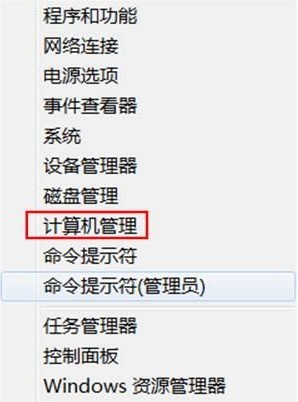
Windows 8 透過電腦管理移除本地帳戶,操作不可逆,請謹慎執行:
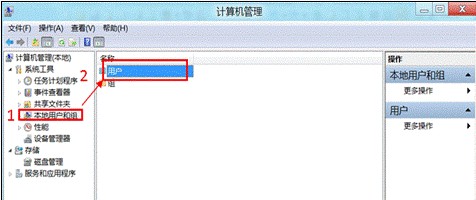
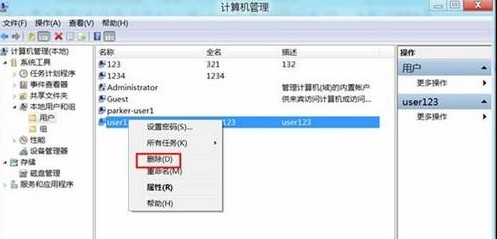
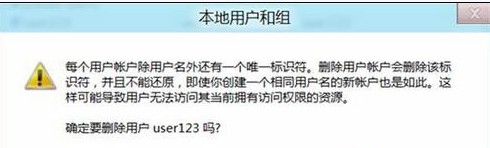
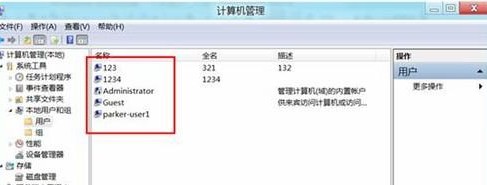
關鍵提醒:
• 刪除前請備份該帳戶重要資料 (文件、圖片、桌面檔案等)。
• 該帳戶擁有的加密檔案 (EFS) 將永久無法解密。
• 無法刪除目前登入中的帳戶,需先切換至其他管理員帳戶執行。
• 內建 Administrator 與 Guest 帳戶無法刪除,僅能停用。
Win8 RP (Release Preview) 頻繁當機?啟用 Hyper-V 核心虛擬化修復
Windows 8 購物應用推薦:如意淘全網比價、搜購一站式搜尋,觸控體驗極佳
Windows 8 升級 Windows 8.1 完整 16 步驟圖文教學
Win8.1 WiFi 掉線/連不上?手動啟用 FIPS 相容性優化教學
Win8 對比 Win7:全新 Metro、觸控、雲端與 USB 3.0 原生支援
Win 8 期望功能:智慧化 Windows 體驗指數,購機升級一目瞭然
騰訊官方回應 Windows 8 QQ 卡死問題:中文用戶名觸發 Metro 模式異常,已提交微軟修復
Win8.1 Update 更新 80073712 錯誤?三步驟:服務檢查→重命名 SoftwareDistribution→DISM 修復