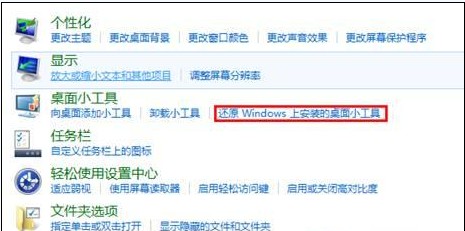
Windows 8 移除了傳統的桌面小工具功能,但若您曾安裝過第三方小工具或系統預設小工具並不慎移除,仍可透過控制面板快速還原。以下是具體操作步驟:
完成上述步驟後,原本卸載的小工具即會重新出現在桌面或小工具庫中,方便您繼續使用時鐘、日曆、天氣等實用工具。
英文版 Windows 8 如何在應用商店下載更多中文應用程式:變更地區設定教學
Windows 8 系統時間自動同步設定:兩種方法對齊網路時間伺服器
Win 8 應用程式安裝路徑在哪?C:\Program Files\WindowsApps 隱藏資料夾
Win8 安裝軟件提示「篩選器已阻止啟動」?SmartScreen 解析與解決
Windows 8.1 Update 降級回 Windows 8.1 官方教學
Windows 8.1 開機直接進入傳統桌面:工作列屬性兩步設定
Win8 設定自動登入 + 取消喚醒密碼,家用電腦開機直達桌面零等待
快速查詢 Win 8.1 WinSxS 資料夾真實大小:DISM 工具教學