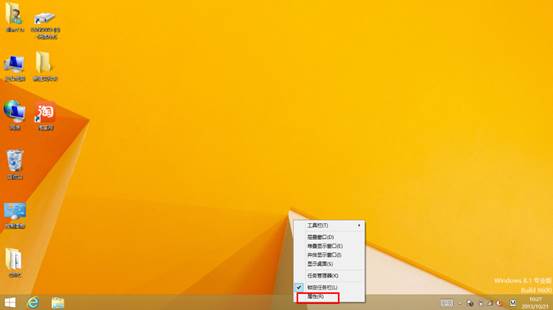
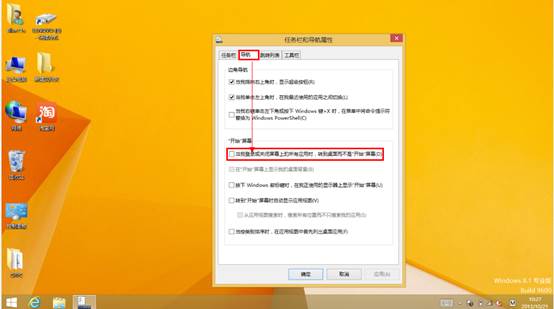
Windows 8.1 允許使用者跳過開始畫面,開機直接進入傳統桌面,設定極為簡單。
重新開機後即可直接看到熟悉的桌面環境,適合偏好傳統操作習慣的使用者。
Win8 人脈應用聯繫人鏈接功能圖文教程:整合多社交帳戶同一聯繫人
Windows 8.1 最新版 6.3.9600.16581 畫面賞析
Windows 8.1 開機直接進入傳統桌面:工作列屬性兩步設定
Win8 取消開機登入密碼:自動登入設定三步驟
Win8 徹底移除 Metro 現代應用?PowerShell 指令批次解除安裝
Win 8 登入 QQ 後取消自動啟動 QQ 寵物 設定介面關閉選項
Windows 8 終極概念圖搶先賞:Metro UI、區域滑動、多用戶切換、無標題列控制台
微軟優先向 OEM 與 TAP 夥伴提供 Windows 8 RP Build 8400 下載