Win7 資源管理員「編輯」選單新增「複製到資料夾」與「移動到資料夾」功能,可快速將檔案/資料夾複製移動至目標位置,無需雙視窗切換。
預設不顯示選單列,按 Alt 鍵或調整資料夾選項永久顯示。選取來源檔案 → 編輯 → 複製到/移動到資料夾 → 選擇目標位置即可。
兩功能對應 32 位元識別碼:
複製到資料夾:{C2FBB630-2971-11D1-A18C-00C04FD75D13} (Microsoft Copy To Service)
移動到資料夾:{C2FBB631-2971-11D1-A18C-00C04FD75D13} (Microsoft Move To Service)
開啟 regedit,定位 HKEY_CLASSES_ROOT\AllFilesystemObjects\shellex\ContextMenuHandlers,建立上述兩個鍵值。或將以下內容存為 Add.reg 雙擊匯入:
Windows Registry Editor Version 5.00

[HKEY_CLASSES_ROOT\AllFilesystemObjects\shellex\ContextMenuHandlers]
[HKEY_CLASSES_ROOT\AllFilesystemObjects\shellex\ContextMenuHandlers\{C2FBB630-2971-11D1-A18C-00C04FD75D13}]
[HKEY_CLASSES_ROOT\AllFilesystemObjects\shellex\ContextMenuHandlers\{C2FBB631-2971-11D1-A18C-00C04FD75D13}]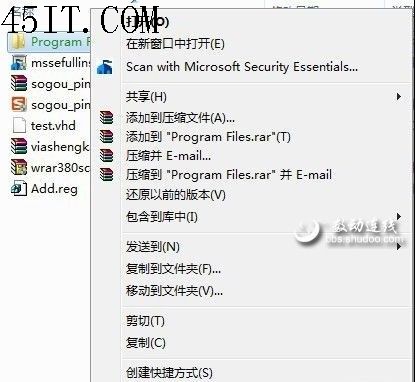
效果: 右鍵選單即可直接呼叫「複製到資料夾」/「移動到資料夾」,操作如同複製貼上般便捷。