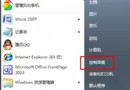
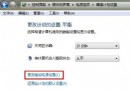
Win7 早期版本即存在播放影片出現鋸齒、馬賽克、模糊問題,線上影音 (風行、UUSee、迅雷看看) 同樣受影響。換播放器無效,問題與顯卡驅動相容性有關。在廠商修復前,提供暫時解決方案:
注意: 取消桌面合成會影響 Aero 特效使用。觀影結束後請重新勾選恢復設定。
Lenovo Flex 觸控失靈?熱鍵一鍵開啟觸控設定
Windows 7 安裝列印伺服器(TP-Link TL-PS110U 等)完整圖解:TCP/IP 連接埠 + LPR 協定
Win7 64 位元 4GB 記憶體夠用嗎?64 位元系統記憶體支援詳解
玩轉 Windows 7 資料夾管理:釘選、跳躍清單與快速搜尋
Win7 旗艦版架設 IIS 與 FTP 站台完整圖文教學
玩轉Win7資源管理器窗格:導覽、程式庫、預覽、詳細資料靈活組合
Win7 重開機後網路印表機變「離線」?儲存憑證徹底解決
單分區完美運行 Win7/XP 雙系統(一):單檔案系統製作全流程詳解