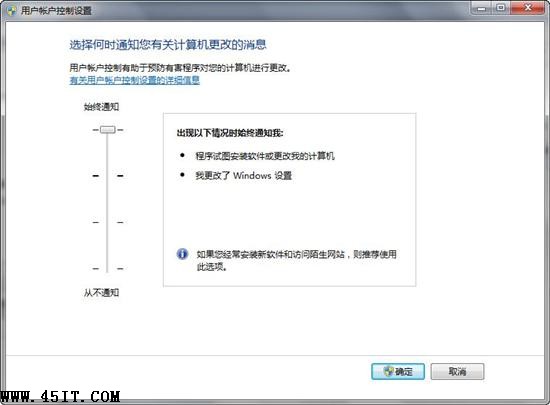
Windows 7 控制台中調整 UAC(使用者帳戶控制)滑桿後點「確定」,對話框卻不關閉、設定不生效。罪魁禍首是安裝 Office 97 修改了登錄,導致 UAC 設定介面邏輯錯誤。
MicrosoftFixit50495.msi
若修復後重新安裝 Office 97,問題會再次出現,需再次執行 Fix it 修復。建議:
微軟已針對此相容性問題提供自動化修復,一鍵解決免去手動編輯登錄風險。
保護硬碟隱私三招:群組原則、登錄隱藏、磁碟管理移除磁碟代號
Win 7 全新工作列深度解析(一):外觀、釘選、統一、縮圖
Windows 7 禁用 UAC 爭議:滑桿拉至「從不通知」換流暢,但拆除安全基石得不償失
Windows 7 必知 15 個超實用快速鍵完整圖解
Win7 如何開啟/關閉螢幕鍵盤?控制台「輕鬆存取中心」兩步直達
Windows 7 手動清除垃圾檔案完全攻略:資料夾與登錄檔雙管齊下
更換 Windows 7 Windows Media Center 主題精簡版教學
Windows 7 無法套用視覺風格/主題錯誤?兩種修復 aero.msstyles.mui 方案