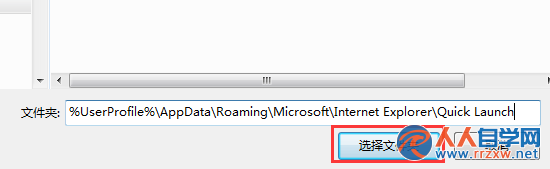
工作列左側快速啟動列不見了?Win7 預設隱藏此功能,但可透過「新增工具列」指向 Quick Launch 資料夾路徑,一鍵喚回經典快速啟動體驗。
%UserProfile%\AppData\Roaming\Microsoft\Internet Explorer\Quick Launch
進階技巧: 若想隱藏標題文字,右鍵工具列取消勾選「顯示標題」與「顯示文字」,僅保留圖示,極簡高效。
Win7 如何恢復隱藏的系統資料夾?資料夾選項與登錄表雙法搞定
Win7 UltraEdit/記事本正確顯示日文、韓文字型:啟用隱藏字型與輸入法設定
Win7Codecs + WMP12:讓 Windows Media Player 12 完美支援所有音視訊格式
Windows 7 變更 Aero 玻璃視窗顏色與透明度完整教學
Win7 瀏覽器網頁顯示亂碼?一鍵修正編碼設定教學
Win7 32 位元待機自動斷網?修改登錄 AwayModeEnabled 禁用離開模式
Win7 Media Player 翻錄音樂儲存位置無法更改?還原音樂庫預設設定修復
Windows 7 卸載漏洞修補程式失敗?完整解決步驟圖解