Windows XP Windows 7 Windows 2003 Windows Vista Windows 綜合教學 Linux 系統教學
Windows 10 Windows 8 Windows 2008 Windows NT Windows Server 電腦軟體教學

Win7 刪除 iertutil.dll 導致無法開機?任務管理器修復法免重灌

編輯:Win7 常見問題解答

誤刪系統關鍵檔 iertutil.dll(IE 核心元件)會導致 Windows 7 無法正常啟動。無需重灌系統,可利用工作管理器啟動命令提示字元,從快取資料夾複製檔案回 System32 修復。

修復操作

  1. 開機進入桌面(若卡在黑畫面,嘗試 Ctrl + Shift + Esc 呼叫工作管理器)。
  2. 工作管理器 → 「檔案」→「新增工作」→ 瀏覽輸入 C:\Windows\System32 → 找到 cmd.exe 右鍵「以系統管理員身分執行」。
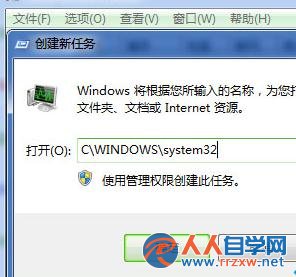
  3. 工作管理器新增工作開啟 CMD
  4. 在命令提示字元依序輸入:
    cd C:\Windows\System32\DllCache(按 Enter)
    copy iertutil.dll C:\Windows\System32(按 Enter)
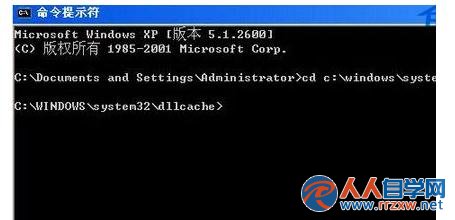
  5. 提示「已複製 1 個檔案」即成功,重新開機驗證。
  6. CMD 複製 iertutil.dll 成功

原理: DllCache 為系統檔案快取備份區,若其中保有完整 iertutil.dll 即可救援。若快取也遺失,需從同版本 Win7 安裝光碟 i386 目錄展開(expand iertutil.dl_ C:\Windows\System32\iertutil.dll)或他機複製。

Copyright © Windows教程網 All Rights Reserved