Windows 7 非伺服器版本預設限制單一使用者遠端連線,遠端登入時本機會被鎖定(黑屏)。透過修改 termsrv.dll 移除此限制,可實現多使用者同時遠端作業(類似終端機服務)。本文提供補丁下載與操作步驟。
UniversalTermsrvPatch-x86.exeUniversalTermsrvPatch-x64.exe
C:\Windows\System32\termsrv.dll 為 termsrv.dll.backup 並修補檔案。若需恢復原狀,以系統管理員身分執行命令提示字元:
takeown /f C:\Windows\System32\termsrv.dll
icacls C:\Windows\System32\termsrv.dll /grant administrators:F
copy C:\Windows\System32\termsrv.dll.backup C:\Windows\System32\termsrv.dll
重開機即可。
gpedit.msc。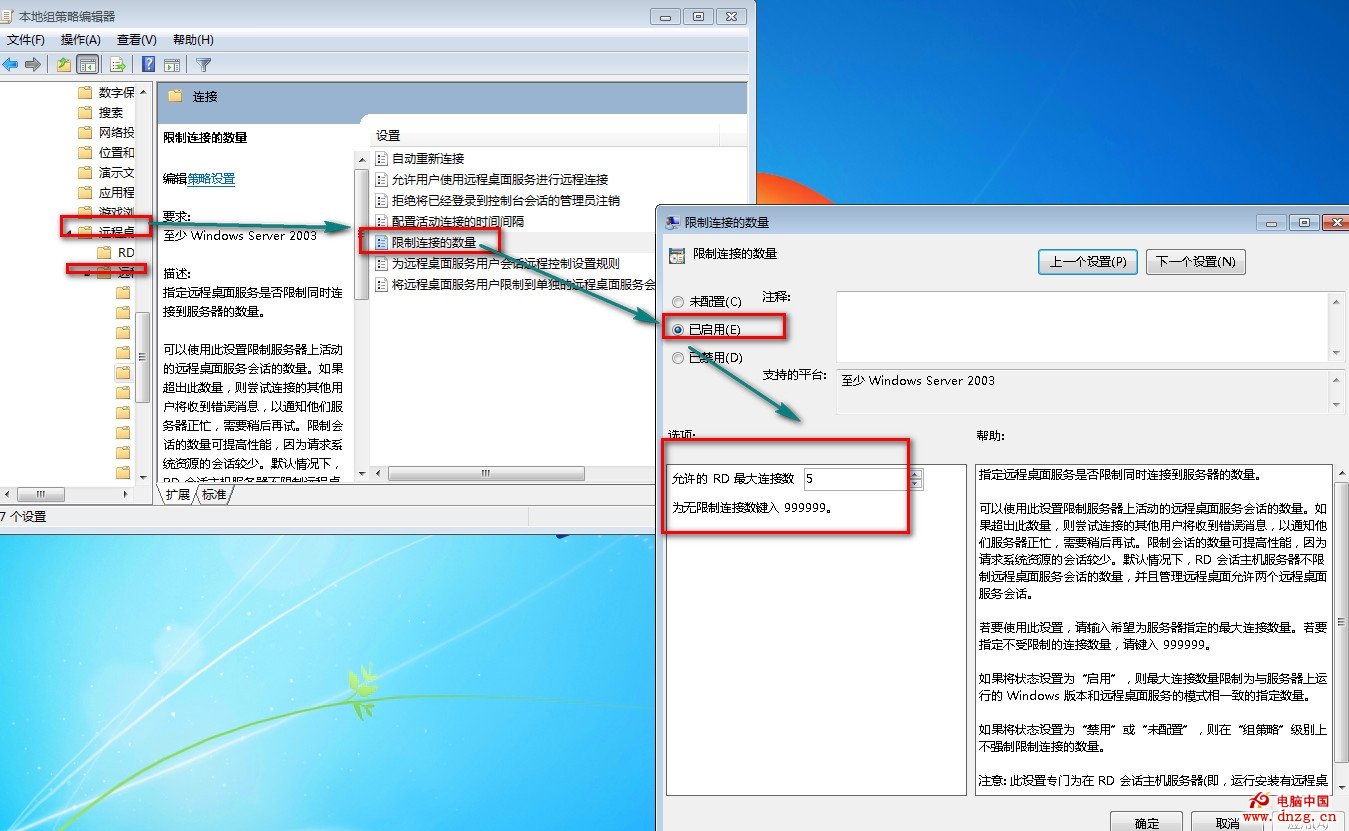
配合修補 termsrv.dll 與群組原則設定,Win7 可突破單一連線限制,實現多使用者並行遠端桌面作業。