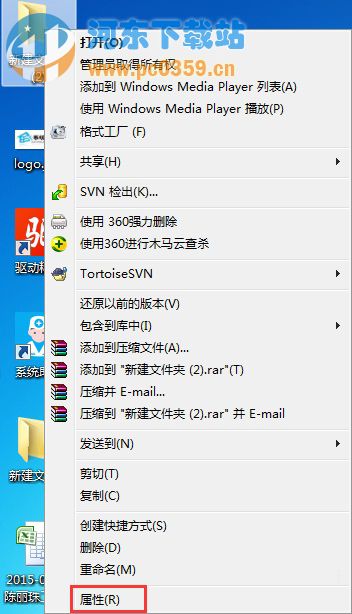
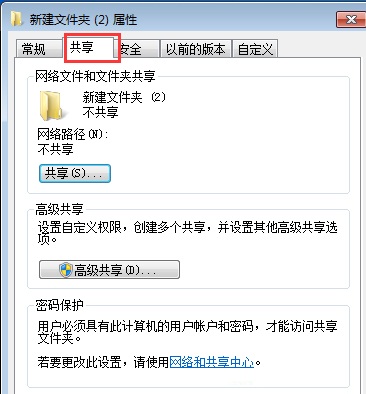
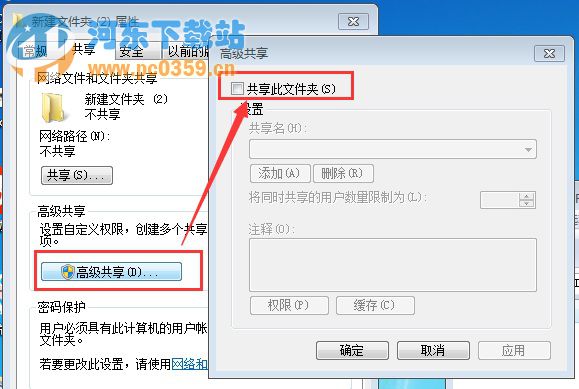
區網預設開啟檔案共用,隱私資料可能被同網段電腦存取。關閉特定資料夾共用,精準保護隱私。
需共用時重新勾選即可開啟,彈性控制。若要完全關閉檔案共用功能,請於「網路和共用中心」→「變更進階共用設定」→ 所有設定檔關閉「檔案和印表機共用」。
Win7 IE 瀏覽器無法開啟首頁怎麼修復?360 全盤掃毒與系統急救箱雙重修復
Win7 如何判斷 svchost.exe 是病毒?任務管理員 + 命令列多重驗證法
Win7 關閉 IE 自動升級 IE11 提示:註冊表修改法徹底停用通知
Win7 UAC 彈出時螢幕不變暗?調整控制等級至「不降低桌面亮度」
Win7 桌面圖示不自動重新整理需按 F5?登錄修復 Update 鍵值解決
Win7雙擊EXE文件無反應?三大修復注冊表關聯法完美解決
Win7 系統建立系統映像備份完整教學
Win7 徹底關閉離線檔案服務:服務管理員停用 Offline Files 禁止開機自啟