一、桌面系統圖示(電腦、回收站、網路等)
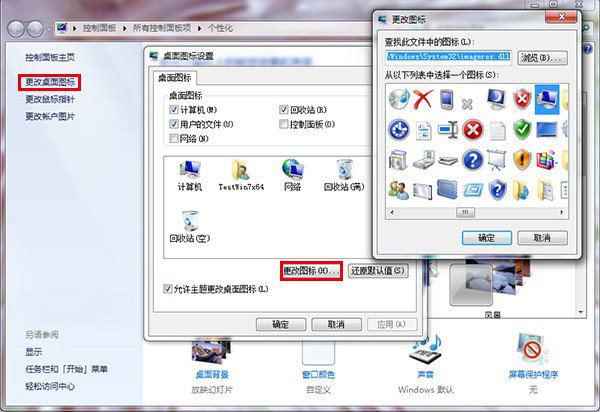
- 桌面右鍵 → 「個人化」 → 左側「變更桌面圖示」。
- 選中要改的圖示 → 「變更圖示」 → 選擇或瀏覽 .ico 檔 → 確定。
二、捷徑圖示
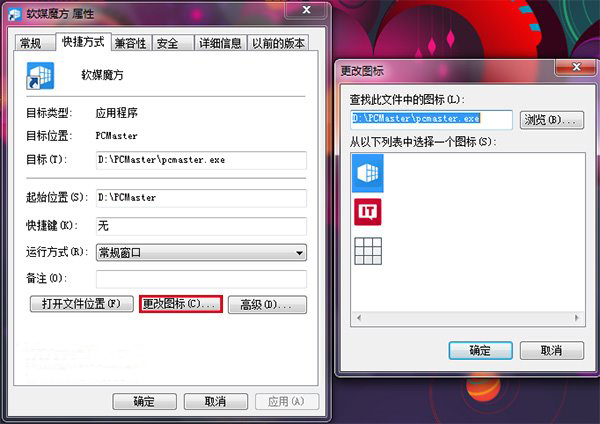
- 捷徑右鍵 → 「內容」 → 「捷徑」索引標籤 → 「變更圖示」。
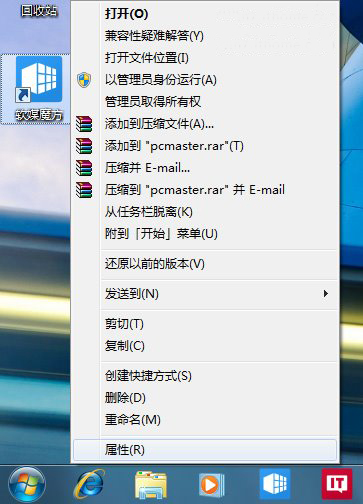
- 選擇系統內建圖示或瀏覽 .ico/.exe/.dll 檔取圖 → 確定。
三、資料夾圖示
- 資料夾右鍵 → 「內容」 → 「自訂」索引標籤 → 「變更圖示」。
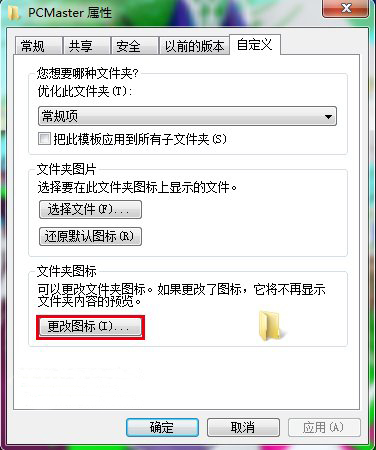
- 同樣選擇或瀏覽圖示檔 → 確定套用。
圖示來源建議
可至 Iconfinder、Icons8 下載免費 .ico 圖示,或從 .exe/.dll 檔(如 shell32.dll, imageres.dll)提取系統內建圖示。