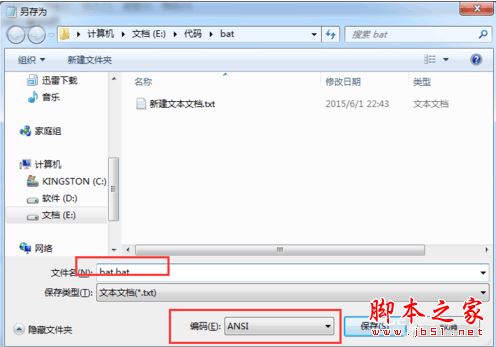
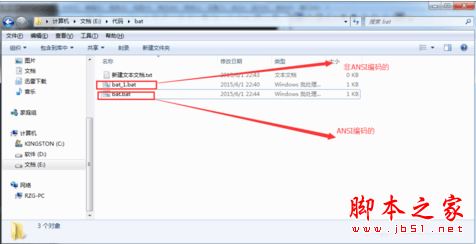
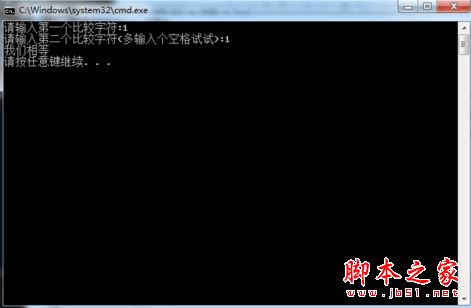
Windows 7 執行 .bat 批次檔出現中文亂碼,根因是檔案以 UTF-8 編碼儲存,而 CMD 預設代碼頁 936 (ANSI/GBK) 無法正確解讀。將檔案編碼轉為 ANSI 即可徹底解決。
原理:ANSI (代碼頁 936) 為 Win7 簡體中文系統預設編碼,CMD 原生支援;UTF-8 需 chcp 65001 且字型支援下才能顯示,不穩定。建議所有批次檔統一用 ANSI 編碼編寫儲存。
chcp 65001
清理 Windows 縮圖快取釋放磁碟空間:從 XP 的 Thumbs.db 到 Vista/Win7 的集中式 thumbcache
Win7 使用 360 雲盤離線下載功能完整圖文教學
Win7 更新後頻繁彈窗「重新啟動電腦」?用群組原則永久關閉強制重啟提示
Win7 顯示與修改檔案副檔名方法:資料夾選項取消隱藏擴充名
Win7 管理開機啟動項與服務:msconfig 精簡啟動加快開機速度
玩《逆戰》《CF》卡屏?多半是顯示卡效能不足或驅動問題
Win7 IE 瀏覽器相容性檢視設定教學:舊版網站正常瀏覽不亂碼
Win7 字型安裝路徑與兩大核心方法:C:\Windows\Fonts 複製法 vs 捷徑安裝法省空間