Windows XP Windows 7 Windows 2003 Windows Vista Windows 綜合教學 Linux 系統教學
Windows 10 Windows 8 Windows 2008 Windows NT Windows Server 電腦軟體教學

Win7 桌面圖示變成文字只有檔名無圖示?刪除 IconCache.db 重建圖示快取

編輯:Win7 系統應用技巧

Win7 桌面圖示全部變成預設「白紙」或只有文字檔名,是 圖示快取檔案 IconCache.db 損壞 導致。刪除該檔案並重開機 (或重啟 explorer.exe) 即可自動重建恢復正常圖示。

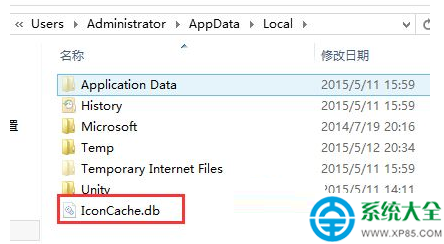
快取檔案位置

C:\Users\您的使用者名稱\AppData\Local\IconCache.db

(舊版路徑可能為 C:\Documents and Settings\使用者名稱\Local Settings\Application Data\IconCache.db)
修復步驟

  1. 開啟「資料夾選項」→「檢視」→ 勾選「顯示隱藏的檔案、資料夾及磁碟機」→ 取消勾選「隱藏受保護的作業系統檔案」。
  2. 在總管地址列貼上 %LocalAppData% → Enter → 找到 IconCache.db → 刪除。
  3. 重開機,或 Ctrl + Shift + Esc → 工作管理員 → 找 explorer.exe → 右鍵「重新啟動」。
  4. 桌面圖示即可恢復正常。

批次檔一鍵修復 (可存為 fix_icon.bat)

@echo off
taskkill /f /im explorer.exe
del /a /q "%LocalAppData%\IconCache.db"
start explorer.exe
echo 圖示快取已重建,請檢查桌面。
pause

預防建議

  • 避免使用未簽署的第三方「桌面美化/圖示包」工具,易損壞快取。
  • 定期清理暫存檔 (cleanmgr) 保持系統整潔。
  • 若頻發生,檢查硬碟健康度 (chkdsk、S.M.A.R.T. 工具)。
Copyright © Windows教程網 All Rights Reserved