Windows Update 執行時出現錯誤代碼 0x80070643,通常代表系統檔案損毀或元件存放區不一致。使用內建的系統檔案檢查器 (SFC) 掃描修復多數可解決。
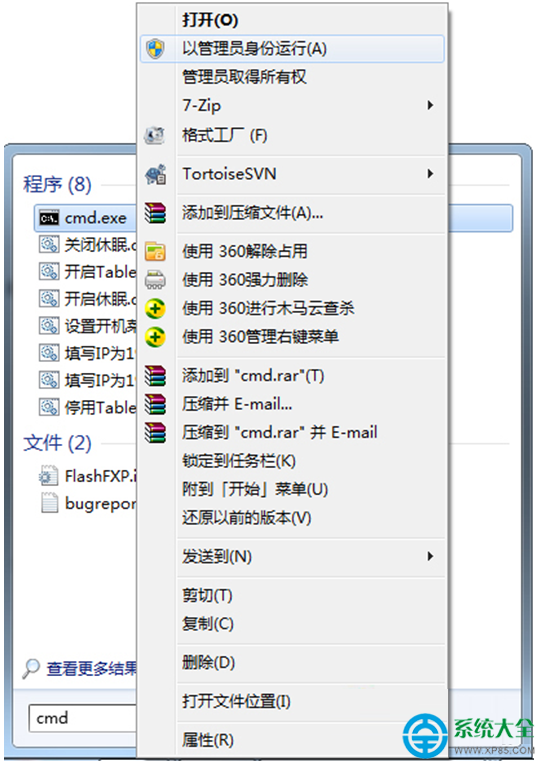
cmd
cmd.exe
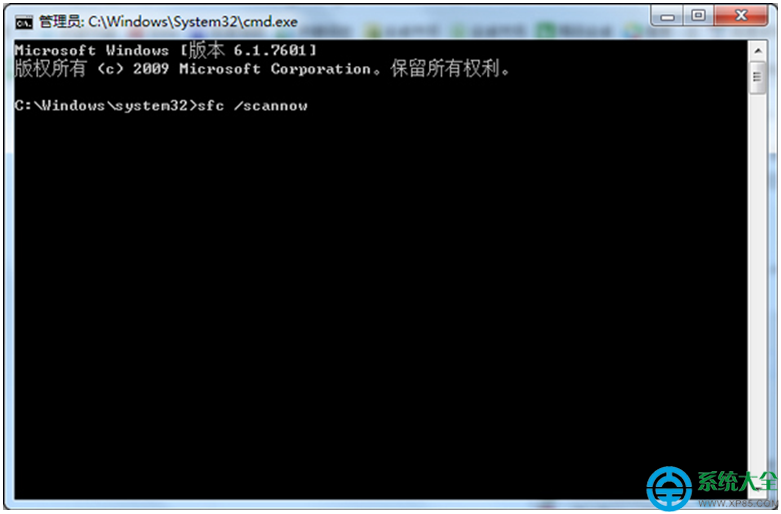
sfc /scannow
若 SFC 無法修復:可進一步執行 DISM 指令修復元件存放區: DISM /Online /Cleanup-Image /RestoreHealth 完成後再執行一次 sfc /scannow。
DISM /Online /Cleanup-Image /RestoreHealth
Win7 如何擴大 C 槽空間?磁碟管理「刪除鄰近分區→延伸磁碟區」無損教學
Win7 設定 360 安全衛士定時自動清理垃圾檔案完整教學
開機出現「掃描並修復磁碟機」倒數計時?別強制關機,這是硬碟自檢在保護你
Windows 7 無法自訂「開啟方式」關聯?刪除登錄 UserChoice 與 OpenWithList 恢復選擇權
Win7 任務列顏色與視窗邊框顏色自訂教學
Win7 內建 VHD 虛擬硬碟:建立、掛載、分區一條龍教學
Win7 透過群組原則禁用 USB 大容量儲存裝置(僅封鎖儲存,保留鍵鼠印表機)
Win7 使用 CMD 指令強制刪除檔案與資料夾完整教學