Windows XP Windows 7 Windows 2003 Windows Vista Windows 綜合教學 Linux 系統教學
Windows 10 Windows 8 Windows 2008 Windows NT Windows Server 電腦軟體教學

Win7 無法正常關機解決方案:病毒掃描、登錄修復、群組原則

編輯:Win7 系統應用技巧

Win7 關機卡住、長時間停留在「正在關機」、強制斷電才能關機,常見原因包括病毒木馬、登錄 shutdownwithoutlogon 鍵值錯誤、群組原則禁用關機命令。分三階段排查修復。

階段一:病毒掃描

開啟防毒軟體執行「全盤掃描」,若耗時極長可設定「掃描完成後自動關機」,避免守候。木馬進程常阻礙正常關機流程。

階段二:登錄修復 shutdownwithoutlogon

  1. Win+R → regedit → Enter。
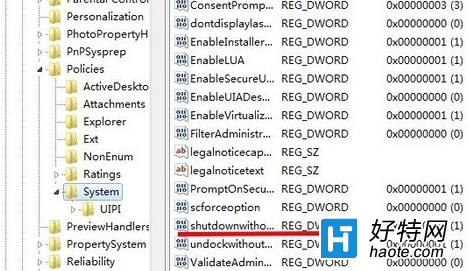
  2. 導航:HKEY_LOCAL_MACHINE\SOFTWARE\Microsoft\Windows\CurrentVersion\Policies\System
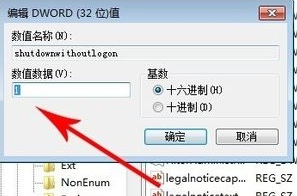
  3. 找 shutdownwithoutlogon,雙擊 → 基數選「十六進位」→ 數值資料改為 1 → 確定。
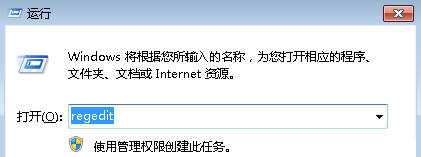
執行regedit

Policies\System路徑

修改shutdownwithoutlogon為1

階段三:群組原則檢查關機命令是否被禁用

  1. Win+R → gpedit.msc → Enter。
  2. 展開:使用者設定 → 系統管理範本 → 開始功能表和任務列
  3. 右側找到四項:「從開始功能表移除並禁止存取『關機』/『重新啟動』/『睡眠』/『休眠』命令」,逐一雙擊設為 「已停用」 或 「未設定」。

群組原則-開始功能表路徑

關機命令原則

設為已停用

其他檢查

  • 電源選項 → 「選擇電源按鈕的動作」→ 確認「關機」設定正確。
  • 執行 sfc /scannow 修復系統檔案。
  • 檢查硬體:電源供應器老化、主機板電容鼓包也會導致關機異常。
Copyright © Windows教程網 All Rights Reserved