Windows Update 出現錯誤代碼 0x80070643,通常表示系統檔案損毀或元件存放區異常。執行系統檔案檢查器 (SFC) 可自動修復大多數此類問題。
cmd,右鍵搜尋結果選擇「以系統管理員身分執行」。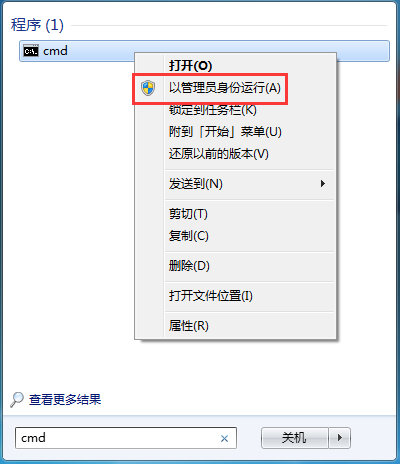
sfc /scannow 按 Enter。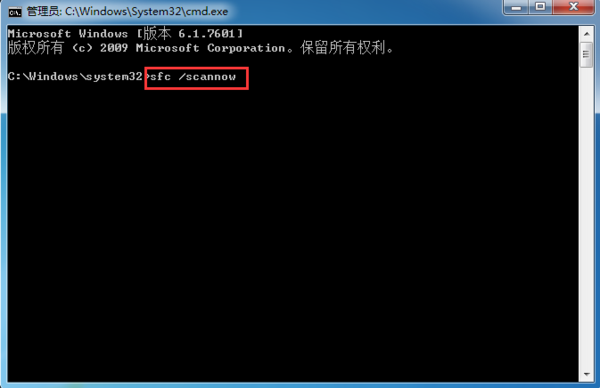
DISM /Online /Cleanup-Image /RestoreHealth 修復元件存放區(需網路下載修復檔)。wuauserv、bits、cryptsvc 服務,重命名 C:\Windows\SoftwareDistribution 與 C:\Windows\System32\catroot2 資料夾,重啟服務。chkdsk C: /f /r(需重開機執行)。大多數 0x80070643 執行 sfc /scannow 後即可解決,建議定期執行 SFC 維護系統健康。
Windows 7 寬帶撥號錯誤 711:啟動遠程存取連線管理器等服務解決
无线路由器加密全攻略:WPA2-PSK 最强、WEP 仅作兼容、密钥更新周期设置、排障清单
Win7 開啟 IE11 跳出「離線工作」視窗?一鍵設定「從不撥號」解決
Win7當機卡死別強制關機!重啟 explorer.exe 秒恢復順暢
Win7 撥號寬帶連線不顯示撥號介面?啟用「連線時顯示進度」與「提示名稱密碼」選項
這配置能玩《守望先鋒》嗎?CPU/顯卡/內存全短板,換機或升級四核獨顯 8G 內存
Win7 Steam 更新失敗無法登入?刪除 package 資料夾強制重新更新
Win7 IIS 7 本機 ASP 後台報錯 80004005?授權 C:\Windows\Temp 給 IUSR 解決