Windows XP Windows 7 Windows 2003 Windows Vista Windows 綜合教學 Linux 系統教學
Windows 10 Windows 8 Windows 2008 Windows NT Windows Server 電腦軟體教學

Win7 群組原則報錯「MMC 無法建立管理單元」?環境變數 Path 修復系統路徑

編輯:Win7 系統應用技巧

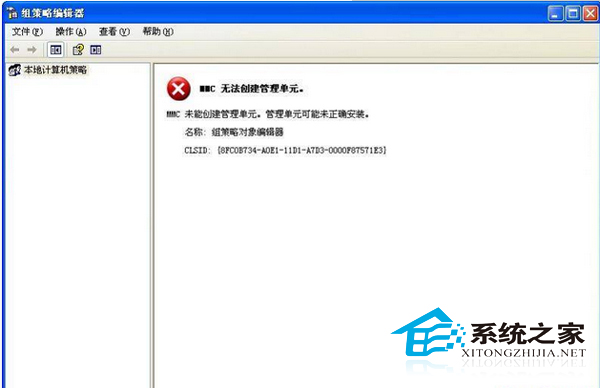
執行 gpedit.msc 提示「MMC 無法建立管理單元」,主因是系統環境變數 Path 遺失關鍵系統路徑。修復方法:

修復步驟

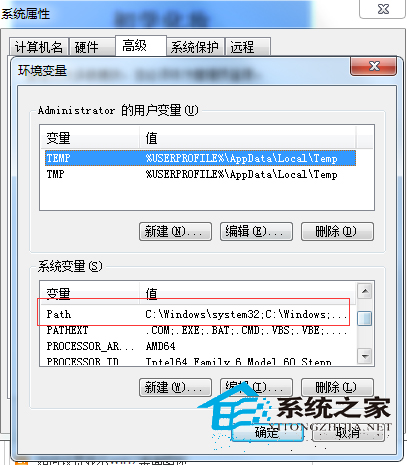
  1. 滑鼠右鍵「電腦」→「內容」→「進階系統設定」→「進階」→「環境變數」。
  2. 「系統變數」區找到 Path,雙擊編輯。
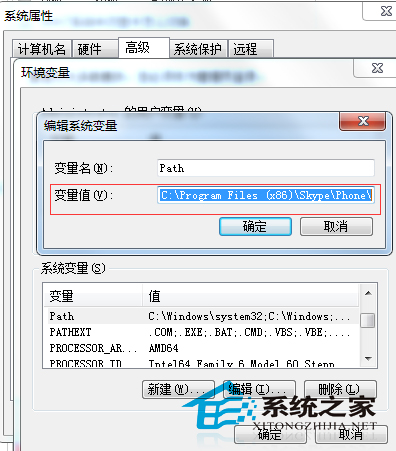
  3. 將「變數值」修正為標準預設值:
    %SystemRoot%\system32;%SystemRoot%;%SystemRoot%\System32\Wbem
  4. 若已安裝其他開發工具 (MySQL, PHP, Java 等),在上述值後方以分號追加對應路徑,例如:
    %SystemRoot%\system32;%SystemRoot%;%SystemRoot%\System32\Wbem;C:\mysql5.5\bin;C:\php;C:\jdk1.8\bin
  5. 確定儲存,重新執行 gpedit.msc 應正常開啟。

MMC 無法建立管理單元錯誤

環境變數編輯 Path

Path 修正為標準系統路徑

快速開啟群組原則替代法: Win + R → gpedit.msc 直接執行。若 Path 修正後仍失效,嘗試執行 sfc /scannow 修復系統檔案,或檢查 C:\Windows\System32\gpedit.dll 是否存在。


Copyright © Windows教程網 All Rights Reserved