Windows XP Windows 7 Windows 2003 Windows Vista Windows 綜合教學 Linux 系統教學
Windows 10 Windows 8 Windows 2008 Windows NT Windows Server 電腦軟體教學

Windows 7 官網免費升級 Windows 10 完整圖文教學

編輯:Win7 系統應用技巧

微軟官方提供 Windows 7 合法授權用戶免費升級 Windows 10 的管道。本文記錄透過微軟官網加入 Windows 預覽體驗計劃(Windows Insider Program)進行升級的完整流程,供參考。

升級前準備

  • 確認 Windows 7 為正版授權並已啟用。
  • 備份重要資料(升級過程雖保留檔案,但建議備份)。
  • 網路連線穩定。

操作步驟

步驟 1:登入微軟官網

開啟瀏覽器前往微軟官方網站,使用 Microsoft 帳號登入。

微軟官網登入頁面

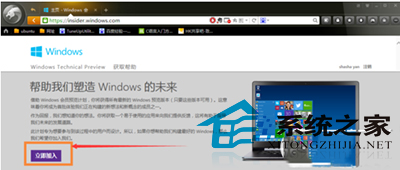
步驟 2:加入 Windows Insider 計劃

登入後點選「立即加入」,參加 Windows 預覽體驗計劃。

加入 Insider 計劃

步驟 3:接受條款並下載升級工具

閱讀並接受「使用條款與隱私權聲明」,點選「我接受」。後續將引導下載升級助手或透過 Windows Update 進行升級。
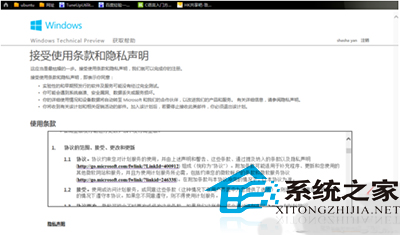
接受條款畫面

重要提醒:免費升級優惠已於 2016 年 7 月 29 日正式結束。目前若從 Windows 7 升級 Windows 10,需購買 Windows 10 授權金鑰進行啟用。建議直接購買正版 Windows 10 進行乾淨安裝,以獲得最佳效能與支援。

Copyright © Windows教程網 All Rights Reserved