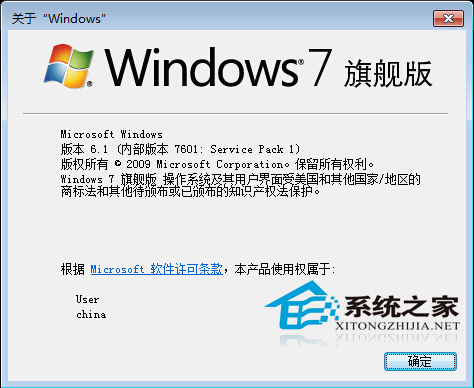
右鍵「電腦」→「內容」只顯示大版本(如 Windows 7 旗艦版),看不到組建號。CMD 下 winver 能顯示完整版本資訊(含組建號、Service Pack 等)。
winver
CMD
驗證是否打上 SP1、確認熱修補版本、技術支援溝通時,這個彈窗資訊最權威。
Win7 解決 ActionScript 錯誤:更新/重裝 Flash Player 完整步驟
電腦螢幕亮度對比度調多少最護眼?辦公/遊戲/影音分場景建議值
Win7 磁碟管理分區提示「不支援動態磁碟」解決:四主分區限制、邏輯分區建立、DiskPart 指令操作
Win7 快速查看捷徑對應的真實程式路徑教學
Windows 7 播放影片出現馬賽克?相容模式關閉 Aero 一鍵解決
Win7 滑鼠拖尾/軌跡殘影?關閉「顯示游標軌跡」即刻解決
Win7 磁碟分區表遺失如何恢復?Bootrec 與 DiskGenius 雙方案實戰
Win7 寬帶路由器 DNS 被竄改?四步徹底淨化網路環境