開機按 F2 進入 BIOS 卻顯示 IPV4... IPV6... 無法啟動硬碟,主因為 BIOS 開機模式設為 UEFI,但硬碟為 MBR 分割表。需將 Boot Mode 改為 Legacy (或 CSM) 以相容 MBR 開機。
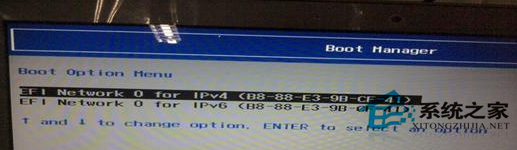
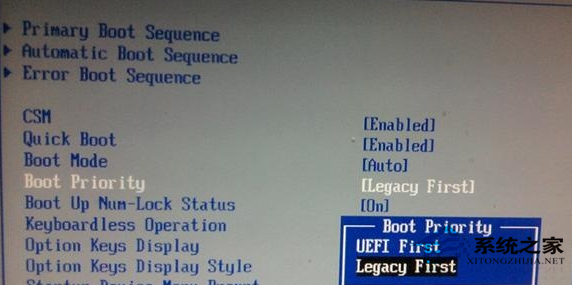
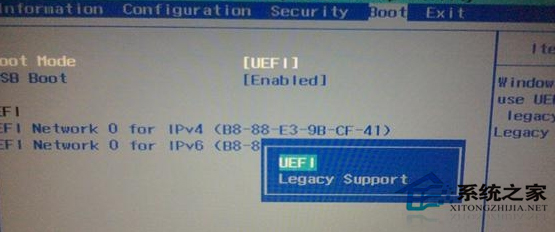
若硬碟為 GPT 分割表且系統為 UEFI 安裝,則應設為 UEFI 模式。Win7 多為 MBR+Legacy 安裝,設為 Legacy First 最相容。
Win7 提示「此 Windows 副本不是正版」?正版驗證失效完整解決方案
Win7 IE 提示「Internet Explorer 未能完成安裝」?重設 IE 或重新安裝完整安裝包
Win7 清除搜尋索引檔案 (Windows.edb) 釋放 C 槽空間,備份還原提升重灌效率
Win7 實體記憶體佔用過高解決:停用非必要服務釋放 RAM
Win7 訪問局域網共享提示「無權限使用網路資源」?刪除「拒絕從網路訪問」Guest 限制
Win7 遊戲提示 Script Error 腳本錯誤?註冊 actxprxy.dll 與 shdocvw.dll 修復
Win7 安裝軟體提示 NSIS Error 解決方案:建立捷徑加參數 /NCRC、重新下載安裝包、硬體相容性排查
Win7 出現「Dpp Viewer Module 停止運作」?升級或相容模式修復 Digital Photo Professional