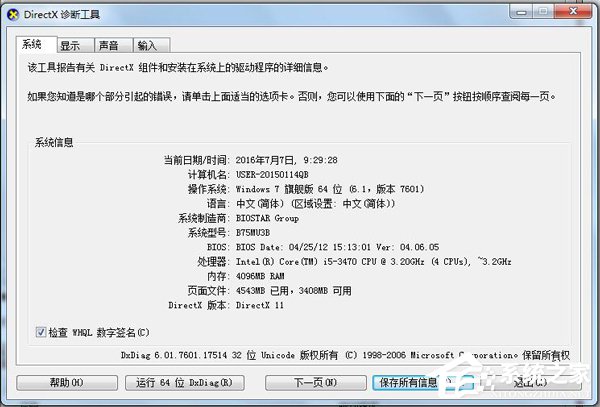
執行大型遊戲/CAD 提示 Direct3D 加速不可用,核心原因通常是顯卡驅動缺失/異常。用 dxdiag 診斷工具檢查驅動狀態,再針對性修復。
診斷與修復流程
- Win+R →
dxdiag → 「顯示」索引標籤。
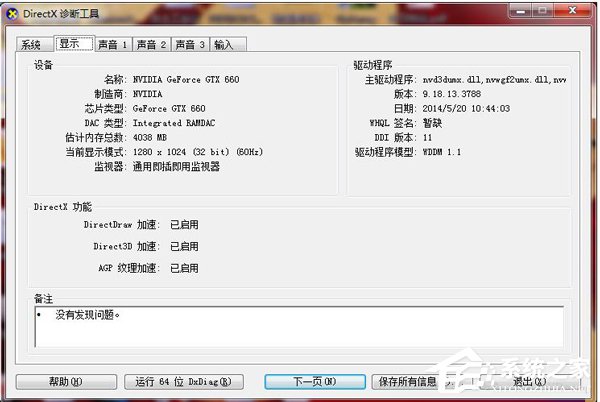
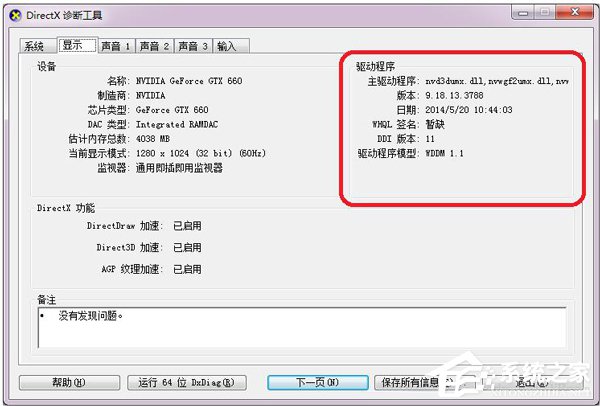
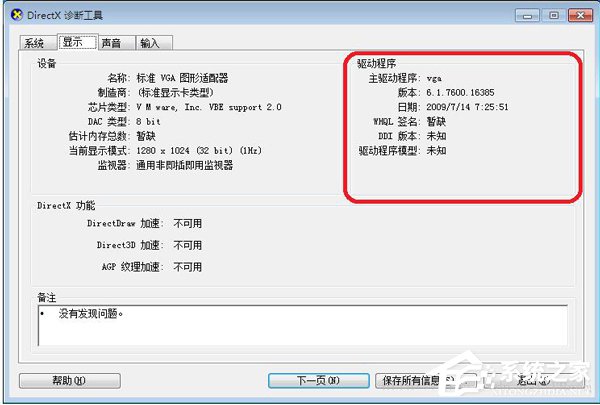
- 查看「DirectX 功能」區:DirectDraw 加速、Direct3D 加速、AGP 材質加速應皆為「已啟用」。
- 重點檢查「驅動程式模型」區:
正常:主驅動列出多個 .dll 檔名、版本非 6.1.7600、日期非 2009/7/14、DDI 版本有數值、驅動模型為 WDDM 1.1 等。
異常:主驅動僅顯示 vga、版本 6.1.7600、日期 2009/7/14、DDI 版本「未知」→ 顯卡驅動缺失。
修復方案
- 知顯卡型號:至 NVIDIA/AMD/Intel 官網下載最新驅動安裝 → 重開機。
- 不知型號:用驅動精靈/驅動人生/360 驅動大師 → 一鍵體檢 → 更新顯卡驅動 → 重開機。
裝好驅動重開機後,再開 dxdiag 應顯示 Direct3D 加速「已啟用」,遊戲/CAD 即可正常運行。