Windows XP Windows 7 Windows 2003 Windows Vista Windows 綜合教學 Linux 系統教學
Windows 10 Windows 8 Windows 2008 Windows NT Windows Server 電腦軟體教學

Win7 系統遺失 Comres.dll 導致程式無法啟動的快速修復

編輯:Win7 系統應用技巧

Win7 執行特定遊戲(如 QQ 地下城與勇士)時彈出「找不到 Comres.dll,無法啟動應用程式」。Comres.dll 為 COM+ 服務核心元件,遺失通常因系統檔案損毀、惡意軟體清理或登錄錯誤。以下提供標準修復流程。
修復步驟

  1. 開啟瀏覽器搜尋「dll 幫」或前往可信任 DLL 下載網站,下載 Comres.dll(注意選擇 32/64 位元對應版本)。
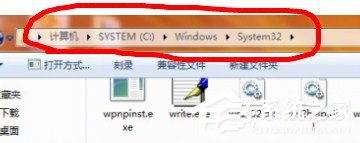
  2. 將下載的 Comres.dll 複製到系統目錄:
     • 32 位元系統:C:\Windows\System32\
     • 64 位元系統:C:\Windows\SysWOW64\(註:64 位元系統 32 位元程式調用路徑)
  3. 以系統管理員身分開啟命令提示字元(Win+R → cmd → Ctrl+Shift+Enter),執行註冊指令:
    regsvr32 comres.dll
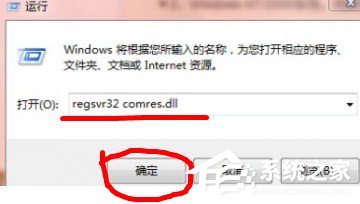
  4. 彈出「DllRegisterServer 在 comres.dll 中成功」訊息即完成修復。

進階建議:若問題重複發生,建議執行 sfc /scannow 掃描修復系統檔案,或檢查是否有安全軟體誤刪系統元件。勿隨意從不明來源下載 DLL,以免植入惡意代碼。

Copyright © Windows教程網 All Rights Reserved