開機彈出 nvstreamsvc.exe - 應用程式錯誤 0x100005ead,主因是 NVIDIA 顯卡驅動的 GameStream 服務異常。提供兩種修復方案,優先嘗試方案一。
方案一:關閉 GameStream 服務(保留驅動)
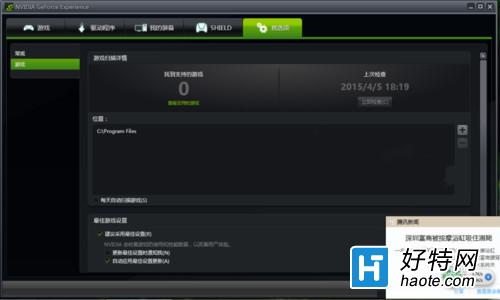
- 右鍵桌面空白處 → 開啟「GeForce Experience」。
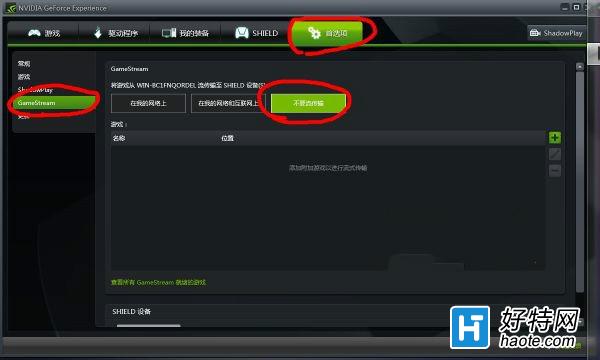
- 點擊齒輪圖示「偏好設定」 → 左側選單選「GameStream」。
- 關閉「啟用 GameStream」開關。
方案二:使用 360 驅動大師重裝顯卡驅動(徹底修復)
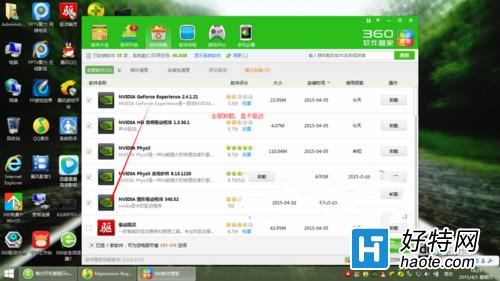
- 開啟「程式和功能」(或 360 軟體管家),卸載所有 NVIDIA 相關程式(驅動、GeForce Experience、PhysX 等)。
- 開啟 360 驅動大師 → 掃描 → 一鍵安裝顯卡驅動(務必用 360 驅動大師,其他工具可能殘留錯誤)。
- 安裝完成重開機驗證。


兩種方案任選其一,均能有效解決 nvstreamsvc.exe 開機報錯問題。