登錄至關重要,修改前務必備份。可透過登錄編輯器以系統管理員身分執行,匯出完整或部分登錄為 .reg 檔。
1. 「開始」搜尋 regedit,右鍵選「以系統管理員身分執行」。
regedit
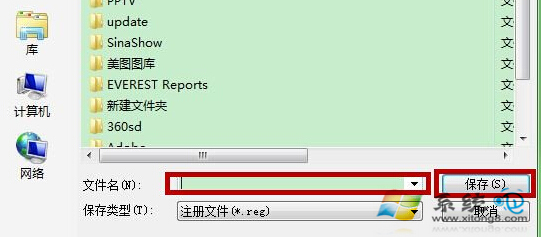
2. 選取欲備份的機碼(或電腦根節點備份全部)→「檔案」→「匯出」→選擇儲存位置與檔名→「儲存」。
日後若登錄出問題,雙擊 .reg 檔匯入即可還原。
Win7 雙硬碟頻繁發聲?同樣是關閉硬碟節電功能解決
Win7 IE10 無法解除安裝?註冊表修復、安全模式、手動清理三大招
Win7 旗艦版因顯卡故障死機黑屏怎麼辦?三大對策:正確驅動、散熱、供電
Win7 也能有圖形解鎖!XUS PC Lock 讓你體驗 Win8 風格圖案密碼
Win7 任務列釘選技巧:一鍵直達常用文件與程式,告別層層找檔
Win7如何查看硬碟序號?diskpart指令快速查詢教學
Windows 7 提升桌面重新整理速度登錄技巧
Win10 開機黑屏過久?進安全模式關閉「快速啟動」與圖形驅動衝突排查