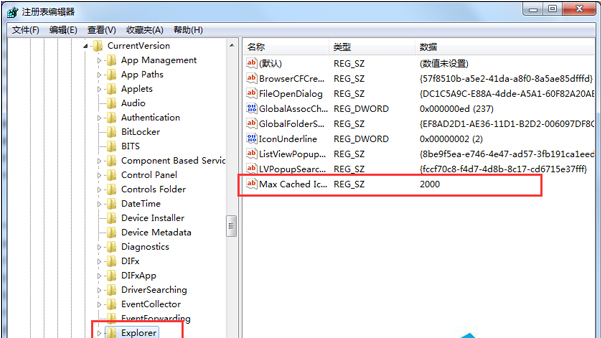
桌面圖示多時按 F5 重新整理緩慢,可擴大圖示快取緩衝區。
regedit
HKEY_LOCAL_MACHINE\SOFTWARE\Microsoft\Windows\CurrentVersion\Explorer
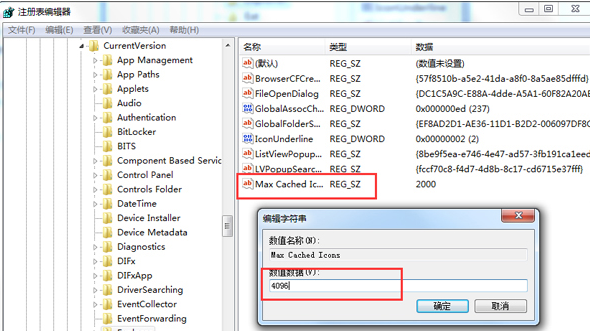
Max Cached Icons
預設值較小(通常 500KB),擴大至 4MB 可明顯減少圖示重繪延遲,不會佔用過多記憶體。
微軟釋出 Windows 7 免費冬日主題與桌布「Winter Fun」
Win7 自訂開機動畫:修改登錄啟用 OEM 背景 + 放置 backgroundDefault.jpg
Win7 桌面圖示變成 .lnk 捷徑檔?註冊檔修復與圖示快取重建
Win7 更換主題後輸入法圖示顏色不變修復:文字服務設定 → 美式鍵盤屬性 → 變更圖示 → 選擇匹配主題顏色
360 安全衛士揭露:打補丁必守「三大原則」,盲目更新反害系統
Win7 修改註冊表玩轉螢幕保護:氣泡變氣球、彩帶數量自訂、神秘線條/3D 文字同法可改
Win7 安裝常見 6 大錯誤代碼與對策:未雨綢繆免驚慌
筆電 Win7 無線滑鼠接收器遺失/損壞?配對替換全流程指南