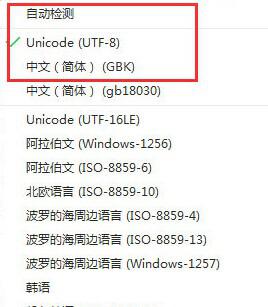
網頁顯示亂碼通常是瀏覽器自動偵測編碼失敗,手動指定即可修正。
大多數中文網頁為 GB2312 或 UTF-8,手動切換通常能立即解決亂碼。
USB 安裝 Win7 完整圖文教學:啟動碟製作 + 系統部署
Win7 任務欄變白、Aero 主題失效?一招啟用 Themes 服務完美解決
Win7 查看 IP 位址三大法:ipconfig 指令、網路共用中心介面、PowerShell Get-NetIPAddress
Win7 使用技巧大全 70 招:神鍵組合、隱藏功能、進階設定一次收藏
Windows 睡眠 vs 休眠 vs 待機 vs 混合睡眠:核心區別、優缺點與最佳選擇指南
Win7 清除「執行」視窗歷史記錄:任務列屬性與網際網路選項雙重清除
解除 Windows Vista/7 TCP 半開連線數限制,提升 P2P 連線效能
Win7 解決 Office 2003/2007/2010/2013 每次開啟都「正在設定」註冊表修復法