Windows XP Windows 7 Windows 2003 Windows Vista Windows 綜合教學 Linux 系統教學
Windows 10 Windows 8 Windows 2008 Windows NT Windows Server 電腦軟體教學

解除 Windows Vista/7 TCP 半開連線數限制,提升 P2P 連線效能

編輯:Windows 7 系統介紹

Windows Vista 起預設啟用 TCP 半開連線限制,可能影響 BT、迅雷等 P2P 軟體的連線數與下載速度。透過修改註冊表可解除此限制。

操作步驟:

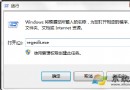
  1. 執行 regedit 開啟註冊表編輯器
  2. 定位至:
    HKEY_LOCAL_MACHINE\SYSTEM\CurrentControlSet\Services\Tcpip\Parameters\
  3. 在右側尋找 EnableConnectionRateLimiting
  4. 刪除該值,或雙擊將數值資料設為 0
  5. 重新開機生效

修改後系統不再限制半開連線數量,P2P 軟體可建立更多同時連線,下載速度通常有明顯改善。注意:此設定可能增加系統對惡意連線攻擊的暴露風險,建議搭配防火牆使用。

Copyright © Windows教程網 All Rights Reserved