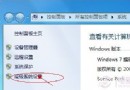
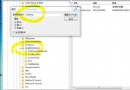
登錄表路徑:HKEY_LOCAL_MACHINE\SOFTWARE\Microsoft\Cryptography\Defaults\Provider\<CSP名稱>
將 Image Path 值從單純檔名(如 GP_MINCSP.dll)改為完整系統路徑(%SystemRoot%\System32\GP_MINCSP.dll)。
| 銀行/裝置 | 登錄表 Provider 名稱 | Image Path 修正值 |
|---|---|---|
| 農行華大 K 寶 | ZGHD Cryptographic Service Provider v1.0 | %SystemRoot%\System32\GP_MINCSP.dll |
| 建行華寶 E 路通 | CIDC Cryptographic Service Provider v2.0.0 | %SystemRoot%\System32\CIDC_CSP.dll |
| 建行捷德 | StarSec CSP CCB | %SystemRoot%\System32\sscsp_ccb.dll |
| 農行動態口令卡 | Microsoft Base Smart Card Crypto Provider | %SystemRoot%\System32\basecsp.dll |
| 農行飛天誠信 K 寶 | EnterSafe ePassAuto CSP For ABChina v1.0 | %SystemRoot%\System32\ePassAutocsp11_ABChina_s.dll |
| 興業銀行 | StarSec CSP For CIB | %SystemRoot%\System32\sscsp_cib.dll |
| 光大銀行 | StarKey220 CSP version 1.0 | %SystemRoot%\System32\GDsk220csp_cebb.dll |
| 建行華大智寶 | CIDC Cryptographic Service Provider v2.0.0 | %SystemRoot%\System32\CIDC_CSP.dll |
| 工行金邦達 | Netting Smart Card Cryptographic Provider v1.2 | %SystemRoot%\System32\cspnet.dll |
| 交通銀行 | Beijing GD CSP BANKCOMM v1.0 | %SystemRoot%\System32\ep2csp32_bc.dll |
regedit 開啟登錄表編輯器。Image Path,修改數值資料為完整路徑。修改登錄表有風險,建議先匯出備份對應分支。若不確定 CSP 名稱,可在該機碼下逐一查找 Image Path 值為單純檔名者進行修正。