Windows XP Windows 7 Windows 2003 Windows Vista Windows 綜合教學 Linux 系統教學
Windows 10 Windows 8 Windows 2008 Windows NT Windows Server 電腦軟體教學

Win7 輸入法無法切換/開啟?ctfmon.exe 進程啟動與開機自動修復

編輯:Windows 7 系統介紹

輸入法圖示消失、無法切換,主因是輸入法管理進程 ctfmon.exe 未執行。本文提供即時啟動與永久修復開機自動啟動兩階段方案。

即時恢復輸入法

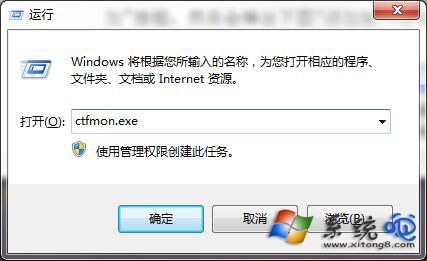
  1. Win+R 輸入 ctfmon.exe 按 Enter。
  2. 語言列即時出現,輸入法恢復正常。

執行 ctfmon.exe 恢復輸入法

永久修復:設定開機自動啟動

  1. Win+R 輸入 msconfig 開啟系統配置。
  2. 啟動 索引標籤(Win7 在工作管理器)找到 ctfmon.exe。
  3. 若狀態為「停用」,右鍵選擇 啟用。
  4. 重新開機驗證。

常見原因分析

  • 第三方優化/清理軟體誤判 ctfmon.exe 為非必要項並停用
  • 使用者手動在 msconfig 中取消勾選
  • 惡意程式禁用輸入法進程
  • 系統更新後註冊表啟動項遺失

進階修復:註冊表啟動項

若 msconfig 中找不到,檢查註冊表啟動路徑:
HKEY_CURRENT_USER\Software\Microsoft\Windows\CurrentVersion\Run
新增字串值 ctfmon = C:\Windows\System32\ctfmon.exe

Copyright © Windows教程網 All Rights Reserved