Windows XP Windows 7 Windows 2003 Windows Vista Windows 綜合教學 Linux 系統教學
Windows 10 Windows 8 Windows 2008 Windows NT Windows Server 電腦軟體教學

Win7 解決 Office 2003/2007/2010/2013 每次開啟都「正在設定」註冊表修復法

編輯:Windows 7 系統介紹

Office 每次啟動都跑「正在設定」進度條,可透過匯入登錄檔設定 NoRereg = 1 禁止重複自我註冊。

製作註冊檔步驟

  1. 開啟記事本,貼上以下內容 (以 Office 2013 為例,版本號對應修改):
Windows Registry Editor Version 5.00

[HKEY_CURRENT_USER\Software\Microsoft\Office\15.0\Word\Options]
"NoRereg"=dword:00000001

版本號對應:
Office 2013 = 15.0
Office 2010 = 14.0
Office 2007 = 12.0
Office 2003 = 11.0

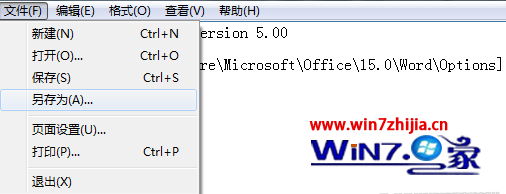
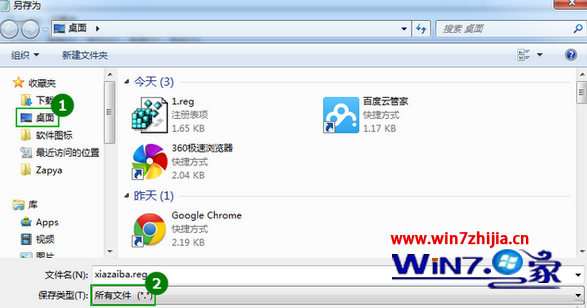
  1. 另存為桌面 FixOffice.reg (類型選「所有檔案」)。
  2. 雙擊匯入 → 是 → 確定。
  3. 重新開啟 Office,不再出現「正在設定」視窗。

注意: Office 2010/2013 需先完成啟用,此法才有效。
記事本另存為 .reg 儲存類型選所有檔案 匯入登錄檔成功
Copyright © Windows教程網 All Rights Reserved