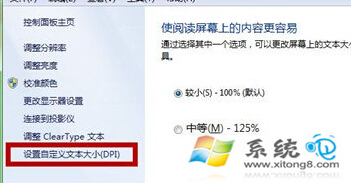
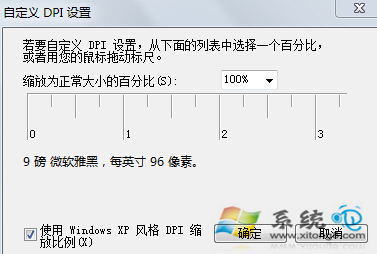
為符合個人閱讀習慣,Win7 可自訂文字大小 (DPI 縮放),預設 100% 可依需求調整。
1. 「開始」搜尋框輸入 DPI 按 Enter,開啟「放大或縮小文字和其他項目」。
DPI
2. 左側選「設定自訂文字大小 (DPI)」,在彈出視窗拖曳尺規或輸入百分比(如 125%、150%),按確定套用。
登出再登入或重新開機後生效,文字顯示大小即符合個人喜好。
修復 Windows 7 更新後藍屏死機:卡巴斯基衝突解決方案
Win7玩不了勁舞團?設定XP SP3相容模式解決閃退
Win7 開機出現「Reboot and Select proper Boot device」?BIOS 啟動順序、硬碟故障、MBR 損壞三大成因解析
Win7 網頁上傳按鈕顯示紅叉?IE 信任網站與自訂安全性設定
Win7 控制台正確使用指南:分類/圖示檢視切換、搜尋功能、地址列導航
Win7 系統安裝使用 Daemon Tools 虛擬光碟機完整教學
Win7系統aliedit.dll丟失修復指南:淘寶登錄組件重新註冊
Win7 利用群組原則限制僅允許指定 USB 隨身碟存取