為保護隱私,可透過登錄隱藏「電腦」右鍵選單中的「內容」選項,防止他人查看系統詳細資訊。
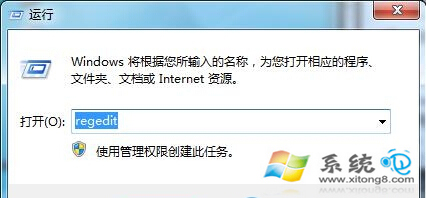
1. 按 Win+R 輸入 regedit 開啟登錄編輯器,建議先從「檔案」→「匯出」備份登錄。
2. 定位至:HKEY_CURRENT_USER\Software\Microsoft\Windows\CurrentVersion\Policies\Explorer
3. 右鍵空白處→「新增」→「二進位值」,命名為 NoPropertiesMyComputer。
4. 雙擊將數值資料設為 1,確定後關閉登錄編輯器,重新開機生效。
此後右鍵「電腦」將不再顯示「內容」選項,系統資訊受保護。