記憶體不足、不想換硬碟?插入 USB 3.0 隨身碟啟用 ReadyBoost,將其作為快取區,能明顯改善小檔案隨機讀取速度,加快系統反應。
啟用步驟
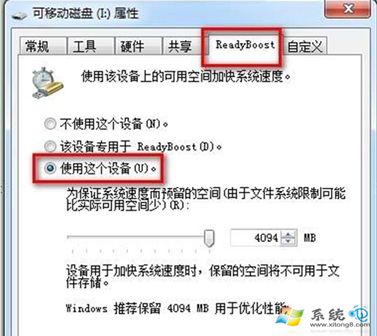
- 插入隨身碟 → 右鍵隨身碟圖示 →「內容」→「ReadyBoost」標籤。
- 選「使用這個裝置」→ 拉桿保留空間 (建議 2-4GB 或全用) → 套用/確定。
效果與限制
- 對 機械硬碟 + 記憶體 ≤ 4GB 效果最明顯;SSD 或大記憶體 (8GB+) 效果微乎其微。
- 隨身碟需支援隨機讀取 2.5MB/s、寫入 1.75MB/s 以上 (USB 3.0 普遍達標)。
- 拔除前請在「電腦」右鍵隨身碟 →「弹出」,避免資料損毀。
- 非永久擴充記憶體,僅作快取,重開機後需重新建立快取檔。
低成本提升舊電腦體驗的實用技巧。