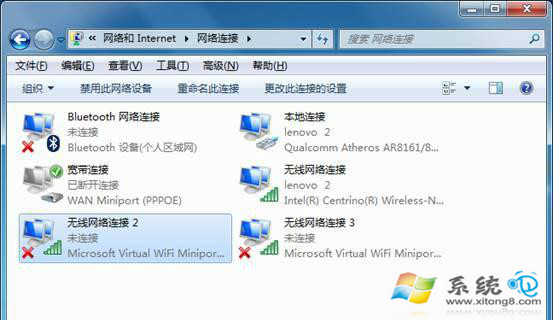
開機跳「錯誤 1067:程序意外終止」針對 Wireless PAN DHCP Service?通常是 Intel 無線網卡驅動異常或 ICS 共用設定錯誤。依序修復驅動、共用設定、服務啟動即可解決。
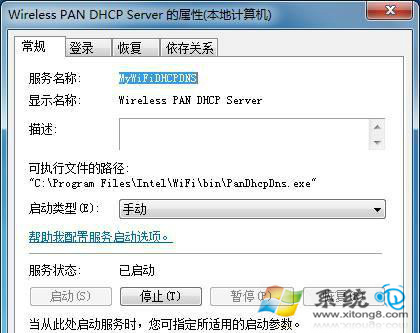
Wireless PAN DHCP Server
若服務啟動類型為「手動」,建議改為「自動」。修復後重開機驗證,錯誤 1067 通常即消失。若持續發生,嘗試解除安裝無線網卡裝置管理員重新掃描硬體變更。
Win7無法開啟WiFi/無線網絡連接修復:手動連接與適配器重置雙重方案
Win7 縮略圖不顯示?五大排查步驟徹底修復預覽功能
Win7建立無線臨時網路/虛擬AP:筆記本秒變無線路由器實現多機共享上網/資料傳輸/局域網遊戲
Win7 旗艦版 IE11 無法解除安裝/重裝?命令列強制移除並還原舊版 IE
解決 Windows 7 音量忽大忽小:關閉「通訊」分頁自動調節音量功能
Win7 PPPoE 撥號上網圖文教學:從新增連線到成功上線
Win7 無法開啟區網共用資料夾:日期年份錯誤導致認證失敗
imm32.dll 無效的 Windows 映像?木馬破壞導致,替換檔案並修復登機檔即可解決