Windows XP Windows 7 Windows 2003 Windows Vista Windows 綜合教學 Linux 系統教學
Windows 10 Windows 8 Windows 2008 Windows NT Windows Server 電腦軟體教學

Win7 旗艦版玩遊戲退出後系統變慢:登錄優化記憶體管理

編輯:Windows 7 系統介紹

現象

大型遊戲退出後系統回應緩慢,重開機才能恢復,懷疑記憶體未正確釋放。

登錄調整方案

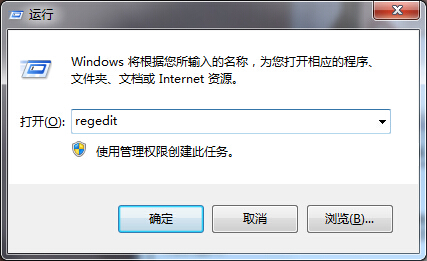
  1. Win+R 輸入 regedit。
  2. 瀏覽至 HKEY_LOCAL_MACHINE\SYSTEM\CurrentControlSet\Control\Session Manager\Memory Management。
  3. 修改兩個值(十六進位):
     • DisablePagingExecutive = 1(強制核心程式碼常駐實體記憶體,不分頁至虛擬記憶體)
     • LargeSystemCache = 1(擴大系統快取,預讀更多磁碟資料至記憶體)
  4. 重新開機生效。

遊戲退出變慢
執行 regedit

此調整適合實體記憶體 4GB 以上的系統。搭配定期清理遊戲暫存檔(%TEMP%、遊戲安裝目錄下的 Cache 資料夾)效果更佳。

Copyright © Windows教程網 All Rights Reserved