Windows XP Windows 7 Windows 2003 Windows Vista Windows 綜合教學 Linux 系統教學
Windows 10 Windows 8 Windows 2008 Windows NT Windows Server 電腦軟體教學

Win7 無法開啟登錄編輯器?群組原則解除封鎖教學

編輯:Windows 7 系統介紹

輸入 regedit 無反應,多半是群組原則「防止存取登錄編輯工具」被啟用,或遭惡意程式修改。本文教您透過 gpedit.msc 解除封鎖。

解除封鎖步驟

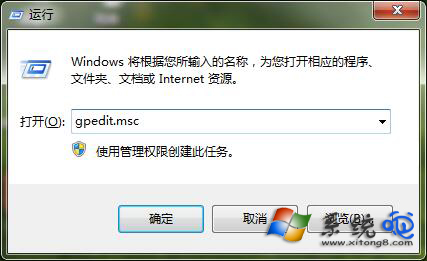
  1. Win+R 輸入 gpedit.msc 開啟群組原則編輯器。
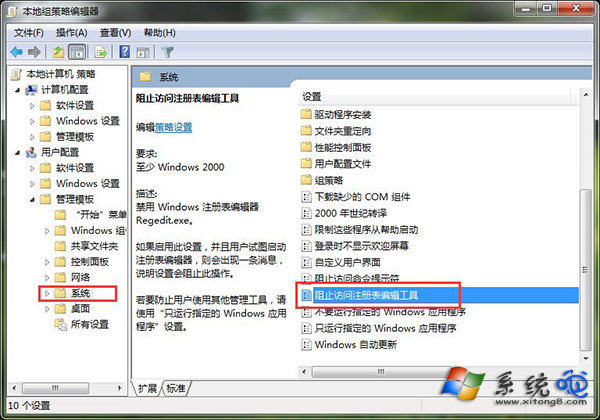
  2. 依序展開:使用者設定 → 系統管理範本 → 系統。
  3. 右側找到 防止存取登錄編輯工具 → 雙擊開啟。
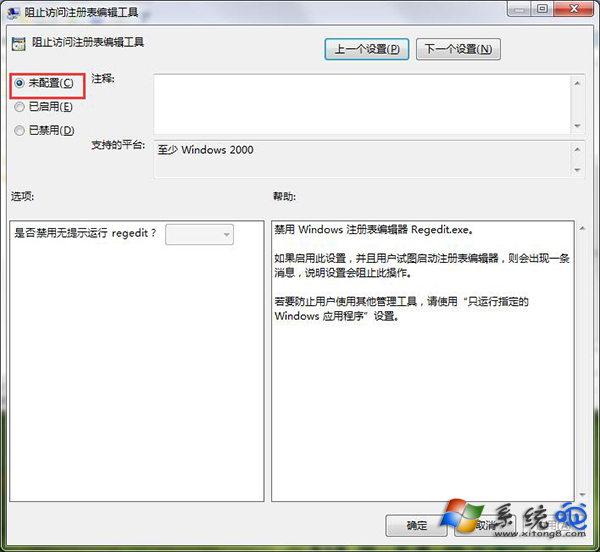
  4. 選擇 未設定 或 已停用 → 確定。

開啟群組原則編輯器

尋找防止存取登錄編輯工具

設定為未設定

Home 版替代方案(登錄編輯器)

若無 gpedit.msc,請嘗試以下方式:

  1. 建立文字文件,貼入以下內容存為 unlock_reg.reg:
Windows Registry Editor Version 5.00

[HKEY_CURRENT_USER\Software\Microsoft\Windows\CurrentVersion\Policies\System]
"DisableRegistryTools"=dword:00000000


  1. 雙擊匯入,重新開機或登出/登入生效。

根因排查建議

  • 近期安裝的「優化大師」、「系統清理」等工具可能誤啟用此原則。
  • 病毒/惡意程式常封鎖登錄編輯器防止手動清除。
  • 建議全盤掃毒後再解除封鎖,避免再次被修改。
Copyright © Windows教程網 All Rights Reserved