Windows XP Windows 7 Windows 2003 Windows Vista Windows 綜合教學 Linux 系統教學
Windows 10 Windows 8 Windows 2008 Windows NT Windows Server 電腦軟體教學

Win7 Win+E 快捷鍵失效?登錄修復 DelegateExecute 值恢復開啟資源管理員

編輯:Windows 7 系統介紹

Win+E 無法開啟資源管理器,常因登錄 DelegateExecute 值損壞。本文提供精準登錄修復法,恢復快捷鍵功能。

修復步驟

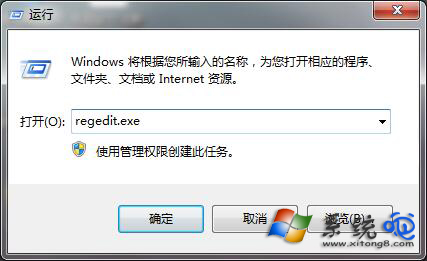
  1. Win+R 輸入 regedit 開啟登錄編輯器。
  2. 導航至:
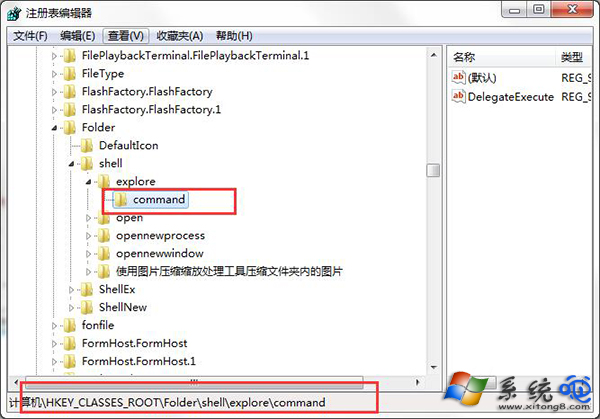
    HKEY_CLASSES_ROOT\Folder\shell\explore\command
  3. 右側找到 DelegateExecute 字串值,雙擊修改數值資料為:
    {11dbb47c-a525-400b-9e80-a54615a090c0}
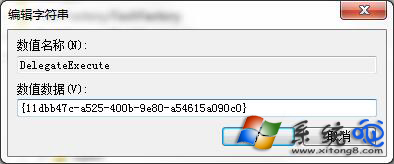
  4. 重新開機生效。

開啟登錄編輯器

定位 DelegateExecute 路徑

修改 DelegateExecute 值

替代開啟資源管理器方式

  • Win+R 輸入 explorer 按 Enter
  • 工作列右鍵 → 啟動工作管理器 → 檔案 → 執行新工作 → 輸入 explorer
  • 建立桌面捷徑指向 explorer.exe

根因分析

第三方殼層擴充套件、優化軟體或惡意程式可能修改此 CLSID,導致 Explorer 開啟委派失效。修復後建議檢查近期安裝軟體。

Copyright © Windows教程網 All Rights Reserved