Windows XP Windows 7 Windows 2003 Windows Vista Windows 綜合教學 Linux 系統教學
Windows 10 Windows 8 Windows 2008 Windows NT Windows Server 電腦軟體教學

Win7 系統 mrt.exe 是什麼?可否刪除?詳細解析

編輯:Windows 7 系統介紹

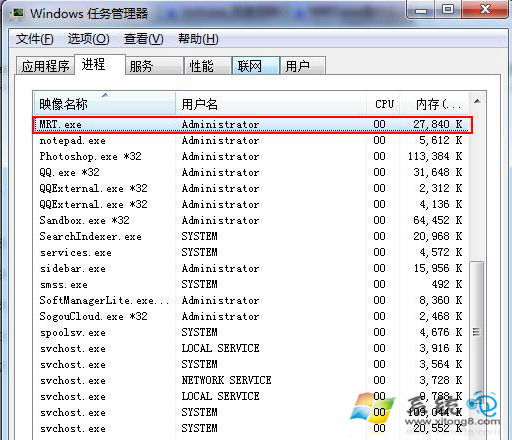
在工作管理員中偶爾看到 mrt.exe 佔用較多記憶體,許多使用者誤以為是病毒。實際上它是微軟官方的惡意軟體移除工具 核心程式。

mrt.exe 詳細資訊

  • 完整名稱: Malicious Software Removal Tool
  • 路徑: C:\Windows\System32\mrt.exe
  • 發行者: Microsoft Corporation
  • 功能: 透過 Windows Update 定期推送,掃描並移除特定流行惡意軟體,屬於輕量級補充防護,非即時防毒軟體。

mrt.exe 進程資訊

為何會佔用資源?

工具在背景執行掃描時會暫時佔用 CPU 與記憶體,掃描完成後通常會自動釋放。若長期高佔用,可能是掃描卡住或與其他安全軟體衝突。

可以刪除或停用嗎?

可以。 系統已安裝完整防毒軟體時,MRT 屬於可選補充,停用不影響核心安全。

停用/移除方法:

  1. 在工作管理員結束 mrt.exe 進程。
  2. 刪除 C:\Windows\System32\mrt.exe 檔案(需 TrustedInstaller 權限,可先取得檔案擁有權)。
  3. 或在「控制台」→「程式和功能」→「檢視已安裝的更新」中,找到「Microsoft Windows 惡意軟體移除工具」解除安裝。
  4. 若要保留但不自動執行,可在「服務」中找不到對應服務(MRT 非服務模式),僅能透過刪除檔案或封鎖執行來阻止。

建議

若電腦效能充足,建議保留讓其定期掃描;若資源有限且已有主流防毒軟體,移除可釋放少量資源。

Copyright © Windows教程網 All Rights Reserved